
Integration guide
Running a Kartt diesel heater from the panel
From panel software 2.5.1, SavvyVan3 runs a Kartt diesel heater directly. The heater's own controller talks to the panel over wireless, so there is no add-on to buy and nothing to wire - pair it, give it a temperature sensor to heat to, and it sits on the heating page with a schedule, Auto Heat and its faults in words.
At a glance
- Works with
- Kartt diesel heaters, through the heater's own controller
- Connects
- Directly over wireless - no add-on, nothing to wire
- Pairs as
- MVK-U7902 BLE, not Kartt
- Adds
- Fan and Diesel at levels 1 to 10, Auto Heat, a weekly schedule, and faults in words
- Needs
- A temperature sensor set to Inside, on a SavvyVan3 with software 2.5.1 or later
- SavvyDot
- No heater slot for a Kartt - its heating stays on the main screen
What this gets you
The same heating page an Autoterm gets, with the Kartt logo at the top: the temperature you want, the temperature the van is actually at, Fan and Diesel buttons with ten levels each, Auto Heat, a weekly schedule, and the heater’s own faults named on the screen. The heater also sits on the right of the main screen, so the temperature is there at a glance.
Before you start
- Update the panel to software 2.5.1 or later. Earlier software cannot find a Kartt at all. Instructions are in the SavvyVan3 user guide.
- The heater fitted and powered, to Kartt’s own instructions, with its exhaust venting to open air. This guide covers the panel’s side only.
- A temperature sensor in the living space. The panel will not burn diesel without one, so have it in place before you start. Every panel comes with a probe, and the installation guide has the wiring.
Pairing it
- On the panel, open Installer Settings, enter the passcode, and go to the device pairing screen - the one with Scan on the right.
- Tap Scan and give it a few seconds to look around.
- Look for
MVK-U7902 BLE. That is the Kartt’s controller. It does not show up as “Kartt”, which catches people out. Tap the green + beside it, and it moves across into the saved list on the left. - Wait for the symbol to turn blue. That is the panel telling you it is connected.
There is no PIN or key to type in.
Setting it up
Back in Installer Settings, tap Heater Settings and check Heater Model reads Kartt - pairing sets it for you. Leave Enable Auto Heat Mode ticked: it is what puts Auto Heat on the heating page.
Then give the heater a temperature to work to. In Additional Settings, set one of the panel’s temperature sensors to Inside - the installation guide shows the page. This step is not optional. The sensor in the Kartt’s controller reads the air going into the heater rather than the van, so the panel does not use it. With no sensor set to Inside, the heating page shows the van’s temperature as UNKNOWN and the heater will not burn at all - not on Auto, not on a level, and not on the schedule. Press Diesel and the panel turns it straight back off and says why: The heater needs an inside temperature probe. Assign a temperature sensor to “Inside” in Additional Settings. Fan still works without one.
Head back to the main page. The heater now sits on the right of the screen with your target temperature on it - tap it for the full heating page.
Using it
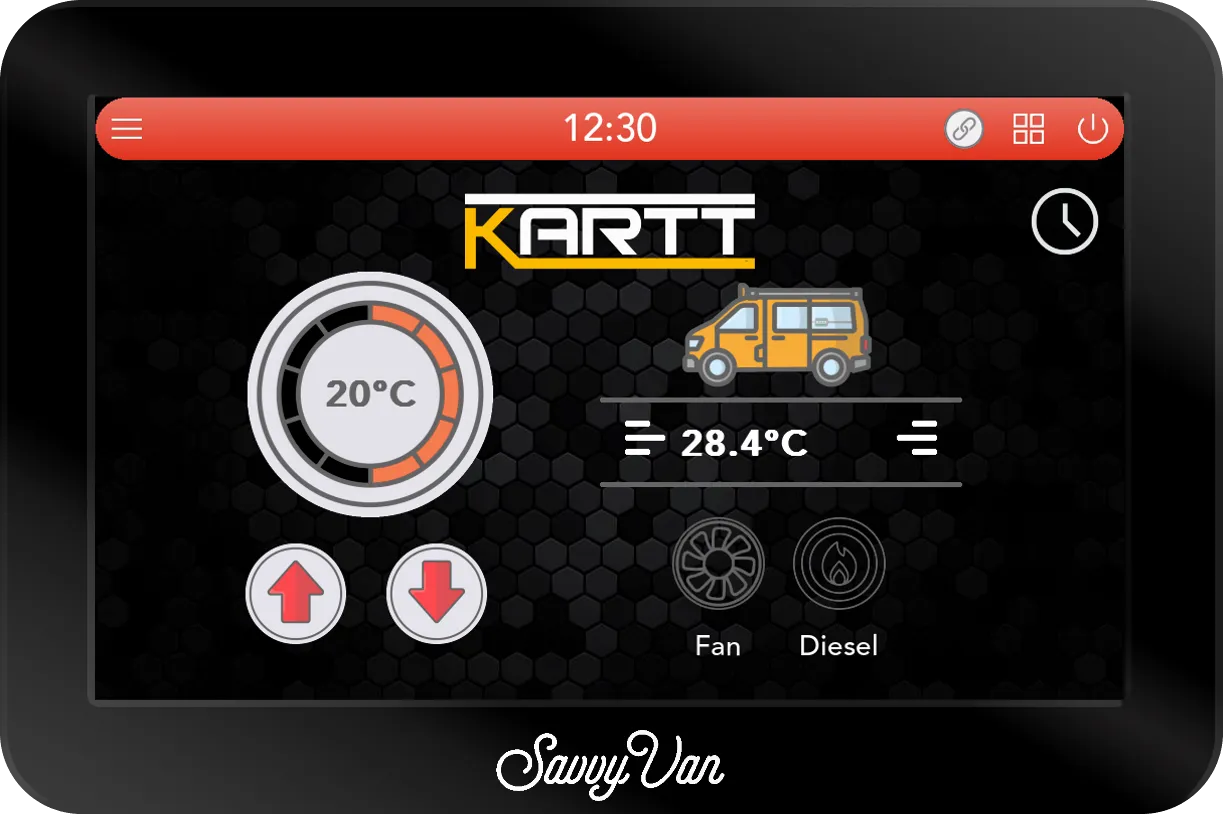
Auto Heat is the easy way to run it. Choose the temperature you want and the panel manages the heater’s output to reach it and hold it, easing off as the van warms.
Tap Diesel again to step past Auto to a level from 1 to 10 instead, if you would rather choose how hard it works. A level still follows your temperature: the heater runs at that level while the van is below it, rests once the van is a degree over, and starts again at the same level a degree under. The flame stays lit on the main screen while it rests - the heat is still on, the heater is simply waiting. Fan on its own moves air and burns nothing, at a level from 1 to 10.
A line under the dial says what the heater is doing at that moment.
Alongside it:
- A weekly schedule, with its own timer. Tap the clock at the top right of the heating page, pick a start time and the days, and how long it runs - from 1/2 hour to 8 hours, or Off to keep heating until somebody turns it off. One start time applies to every day you tick. A scheduled start is always Auto Heat.
- Logic rules. A rule can watch the heater or set it, just as it can an Autoterm - the Kartt has the same Fan and Diesel buttons. See heating with rules.
A SavvyDot has no heater slot for a Kartt, so its heating stays on the main screen.
If the heater reports a fault
If the heater reports a fault, the panel switches it off and puts up a pop-up with the Kartt logo at the top, headed with the fault number the heater’s own display uses and what it means - Fault E-02 - Flame Out, for instance - with what to check underneath. The same entry goes into Notifications, so it is still there if nobody was in the van.
Deal with the cause, then press Reset on the pop-up - until you do, the heating page and the schedule will not start the heater again. Reset clears the fault but does not start the heater: switch it on again once you are happy.
| On the pop-up | What it means |
|---|---|
| Fault E-01 - Startup Failure | It failed to start on two attempts. Check the fuel supply and fuel line, the air intake and the exhaust |
| Fault E-02 - Flame Out | The flame went out while it was running. Check there is fuel and that the fuel line is sound |
| Fault E-03 - High Voltage | The supply stayed above 16V for 5 seconds. Check what is charging the battery - alternator, charger or solar |
| Fault E-04 - Low Voltage | The supply stayed below 10V for 20 seconds. Charge the battery and check the heater’s power wiring |
| Fault E-05 - Outlet Sensor Fault | The air outlet temperature sensor is open or short circuit |
| Fault E-07 - Fuel Pump Fault | The fuel pump is open or short circuit |
| Fault E-08 - Fan Fault | The fan is open or short circuit |
| Fault E-09 - Outlet Overheating | The air leaving the heater went above 160°C. Check the outlet and the ducting are not blocked, and let it cool |
| Fault E-10 - Glow Plug Fault | The glow plug is open or short circuit |
| Fault E-11 - Heater Body Overheating | The heater’s body went above 260°C. Check the air outlet is not blocked, and let it cool |
| Fault E-12 - Overheat Sensor Fault | The overheating sensor is open or short circuit |
There is no E-06. For a sensor, the fuel pump, the fan or the glow plug, check its wiring and connector - and if the same fault comes back after Reset, the heater needs looking at by whoever services it. A number that is not in this list shows as Heater Fault with its number: note the number down and contact your installer.
Troubleshooting
- No
MVK-U7902 BLEwhen you scan? Check the software version first: before 2.5.1 the panel cannot see a Kartt at all. Then check the heater has power, and get closer - pair from inside the van rather than from the far side of it. - The heating page says OFFLINE. The panel has lost touch with the heater. Check the heater still has power; the panel picks it up again by itself once it does.
- It says Cooling for a while after you switch it off. That is normal. The heater runs its fan on to cool itself down, and the page can say Cooling for up to ten minutes before it goes back to Standby.
- Diesel turns straight back off. No temperature sensor is set to Inside - see setting it up.
Still nothing? Tell us what you are seeing, and send us the logs from the passcode screen - Get Help, then Send Logs.
Questions people ask
- Do I need an add-on from SavvyVan?
- No. A Kartt heater's own controller carries the wireless link, so it pairs with the panel directly - unlike a Propex or an Autoterm, which each need an add-on of ours. All you need is a SavvyVan3 on software 2.5.1 or later, and a temperature sensor set to Inside.
- Do you sell the Kartt heater?
- No. It is Kartt's heater, and the panel works with it. For the heater itself - choosing one, fitting it, servicing it - talk to Kartt or whoever supplied it.
- Why is there no Kartt in the pairing list?
- It is there under a different name. The heater's controller shows up as MVK-U7902 BLE, and that is the one to add. Pairing it sets the heater model to Kartt for you.
- I press Diesel and it turns straight back off. Why?
- The panel has no temperature sensor set to Inside, so it has nothing to heat the van against, and it will not burn diesel without one - on Auto, on a level or on the schedule. It says so on the screen and keeps the message in Notifications. In Installer Settings, Additional Settings, set one of the panel's temperature sensors to Inside, then press Diesel again. Fan works without one.
- Can I run it from a SavvyDot?
- No. A SavvyDot's heater slots are for a Propex or an Autoterm, so a Kartt is not offered there. Run it from the heating page on the main screen.