
For trade
Every circuit fused, and the screen knows when one goes
SavvyVan 3.1 is the SavvyVan control board with a fuse on each of its eight switched circuits, a Fuse Monitor on the screen that shows which one has gone, and an emergency override for every circuit. It runs the same software as SavvyVan3, with the same screens, add-ons and phone app, on 12V or 24V - and it is the controller inside SavvyCore.
As with any SavvyVan3, tank levels, heating, levelling and dimmable lighting each need their add-on, and a real battery percentage needs a SavvyShunt or a battery that reports itself. It needs panel software 2.5.1 or later.
SavvyVan 3.1 is sold to trade only - converters, dealers and installers with a SavvyVan trade account. Converting your own van? SavvyVan3 is the way in, and we are always happy to help you pick. See SavvyVan3

What the 3.1 adds
Everything a SavvyVan3 does, and four things more - all on the board, all shown or set from the same screen.
-
A fuse on every circuit
Each of the eight 10A switched circuits runs through its own blade fuse on the board, so every circuit is protected where it is switched and no external fuses are needed.
-
The Fuse Monitor
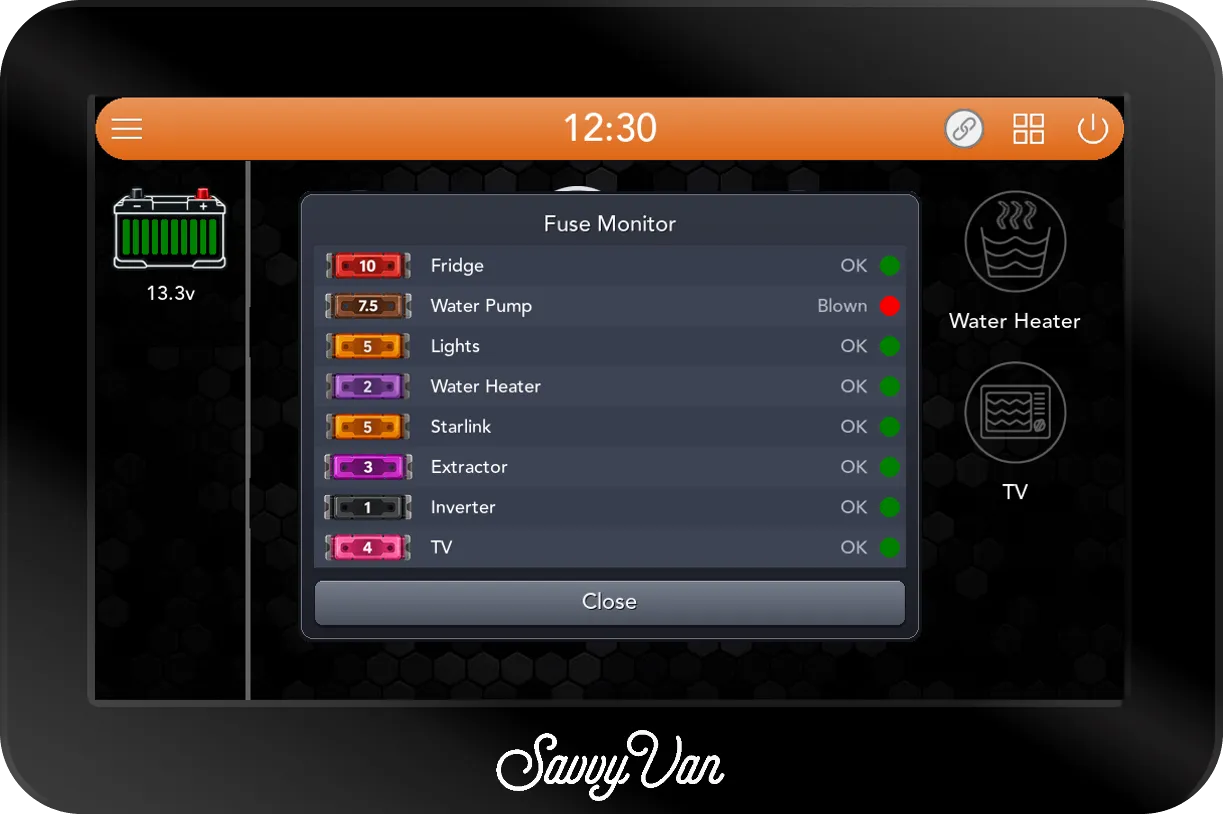
Open it from the side menu and every circuit is listed by its name, with its fuse and OK or Blown beside it. It checks each fuse is intact rather than measuring the load, and when a fuse blows on a circuit that is switched on, the screen wakes and opens it by itself.
-
Emergency overrides
Eight switches on top of the box, one for each circuit, so a circuit can still be switched on if the screen ever fails.
-
Indicator lights
Three lights on the board, set to off, white, blue or a slow wave between the two from Installer Settings.
And everything else a SavvyVan3 does
The software, the screen and the add-ons are the ones you already know.
-
Every circuit on its own tile
Eight switched circuits, each on a tile named for what it runs and switched with a tap. A swipe from the home screen goes straight to the screen you use most.
-
The battery at a glance
Battery voltage on the home screen as standard. Add a SavvyShunt, or fit one of eight batteries it reads directly, for a real state of charge.
-
Water and gas
With SavvyTanks, fresh, grey and black tank levels on the screen, plus underslung LPG with gas solenoid control built in.
-
Heating
With the Propex or Autoterm module, or a Kartt diesel heater paired straight to the panel, the heater runs from the screen: schedules, timers and faults in plain English.
-
Levelling
With SavvyStance, see how the van is sitting, which wheel to lift and by how much.
-
Dimmable lighting
With SavvyLights, eight dimmable channels and scenes you save once and bring back with a tap.
-
Rules that run the van
When it turns cold, a voltage drops, a tile is switched or the clock reaches a time, the panel switches a tile, beeps or puts up a message. Battery, tank, heater and light rules need the add-on for each.
-
The phone app
The SavvyVan app shows the van on your phone, free on iPhone and Android. Switching from it comes with SavvyVan Pro.
-
A second screen
With a SavvyDot, up to five of your controls on a small round touch screen, fixed in place or lifted off its charging plate.
-
Weather, clock and updates
On WiFi the screen keeps the time, shows the local forecast and inside and outside temperature, and takes software updates as they come.
-
Starlink
With a Starlink dish on the same network, its status shows on the screen - no module needed.
-
Your name on the screen
Ship it with your own logo on the screen and a business page built in - a business card in every van you sell.
The details
- Supply
- 12V or 24V
- Size
- 139 x 233 x 24 mm
- Switched circuits
- Eight, 10A each, each on its own blade fuse
- Fuses fitted
- Four 10A, two 5A and two 2A - one for each circuit
- Emergency overrides
- Eight switches on top of the box, one for each circuit
- Starting it
- Press its power button. It switches off if its supply falls to 10V, and after that, or whenever its power has been off, it waits for the button
- In the box
- The 5-inch or 7-inch touch screen, the SavvyVan 3.1, 2m HDMI and USB cables, and a temperature sensor and mount
- Panel software
- 2.5.1 or later
Where you will find it
SavvyVan 3.1 is the controller inside SavvyCore, our trade-only box of charging, fusing and control. It is also available to trade on its own.
Fitting it, and living with it
Talk to us about SavvyVan 3.1
Trade pricing and lead times are worked out with you directly. Already have a trade account? Get in touch. If not, apply and we will come back to you.