
User guide
Living with a SavvyVan 3.1
A SavvyVan 3.1 works exactly like a SavvyVan3, with one thing more: every switched circuit has its own fuse, and the screen can show you which one has gone. This guide covers that, and the rest of the panel is in the SavvyVan3 user guide.
At a glance
- Fuse Monitor
- In the menu, top left - every circuit's fuse, OK or Blown
- If a fuse blows
- The Fuse Monitor opens by itself, if that switch was on
- If a switch stops working
- Check the Fuse Monitor first
- If the screen is dark after the power was off
- Press the power button
- Everything else
- As the SavvyVan3 user guide
Everything you already know
A SavvyVan 3.1 runs the same software as a SavvyVan3, so the main screen, the battery, tanks, heating and lights, WiFi, the phone app, updates and settings all work exactly as the SavvyVan3 user guide describes. It needs panel software 2.5.1 or later, and System Information shows Hardware version 3.1.
The Fuse Monitor
Every switch on your main screen runs through its own fuse on the SavvyVan 3.1, and the panel can see whether each one is intact. To look:
- Switch the circuit on if you are checking one that has stopped working - the monitor checks a fuse with its switch on.
- Tap the menu, top left, and tap Fuse Monitor.
- A box opens over the main screen with a row for each switch - the picture of its fuse, its name, and whether the fuse is intact.
- Tap Close when you are done.
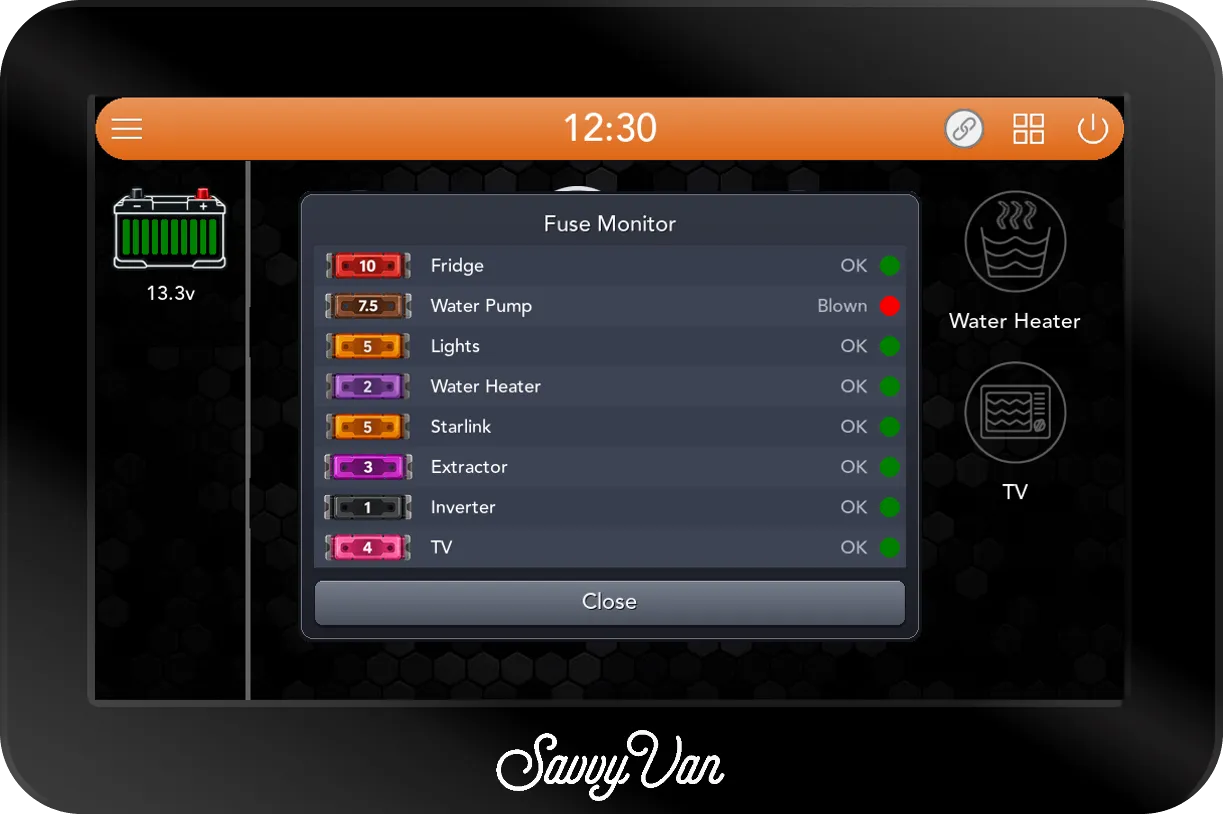
| It says | Meaning |
|---|---|
| OK, green | The fuse is intact - with its switch on |
| Blown, red | The fuse has gone. Replace it with one of the same rating - the picture shows which |
| Unknown, grey | The panel could not read it. If every row says so, get in touch |
| Unused | That position has no switch set up |
The box keeps itself up to date while it is open. It shows whether each fuse is intact, not how much a circuit is drawing.
If a fuse blows while its switch is on, the box opens by itself. The screen wakes, goes to the main screen and opens the Fuse Monitor with that fuse in red. It does not beep or leave a notification, and it opens once for each fuse, so if a switch stops working and you did not see it happen, the Fuse Monitor is still the first thing to look at.
When the power has been off
The SavvyVan 3.1 never starts by itself. If its power has been off - the van isolated, the battery disconnected - or it has switched itself off because the battery fell to 10V, the screen stays dark until you press its power button. Press it and the panel starts as normal. If the battery was flat, charge it too: the panel switched off to protect it.
If the screen ever fails
There are eight override switches on top of the SavvyVan 3.1’s box, one for each switched circuit, so a circuit you need can still be switched on without the screen. They cannot switch anything off. Use them only when the screen is not working, and switch them back once it is.
The lights on the controller
The SavvyVan 3.1 has three small indicator lights of its own. They are not the van’s lighting, and they do not tell you anything about the van - they show white while the panel starts up, and then the colour chosen when it was fitted.
Something not right?
Tell us, and send us the logs at the same time: Get Help, then Send Logs, on the passcode screen.
Questions people ask
- One of my switches has stopped working. What do I check?
- If its fuse blew while it was on, the Fuse Monitor will have opened by itself. If you did not see it, leave the switch on, then open the menu, top left, and tap Fuse Monitor. If that switch's row says Blown, its fuse has gone - replace it with one of the same rating, which the row shows. If it says OK, the fuse is fine, and the fault is further along: ask whoever fitted your panel.
- Why has my panel not come back on?
- The SavvyVan 3.1 never starts by itself. After its power has been off - the van isolated, the battery disconnected - or after it has switched itself off because the battery fell to 10V, press its power button and it starts.
- Will the panel tell me when a fuse blows?
- Yes, if that switch was on. Within a few seconds the screen wakes and the Fuse Monitor opens by itself, with that fuse showing Blown in red. It does not beep or leave a notification, so if somebody closed it before you saw it, the Fuse Monitor in the menu still shows which fuse has gone.
- What are the lights on the controller for?
- They are indicator lights on the SavvyVan 3.1 itself. They do not change with faults, charging or anything else in the van - their colour is a setting chosen when the panel was fitted.