
Setup guide
Automation throughout the van
A logic rule is the panel's if-this-then-that. When the van gets cold, put the tank heater on. When a waste tank is nearly full, sound the buzzer and say so. At half six on a weekday, if it is chilly, warm the van up. You build them once in Installer Settings, from software 2.5.1, and the panel gets on with it.
At a glance
- Where
- Installer Settings → Logic Rules → Add New Rule
- Shape
- WHEN up to three conditions, THEN up to three actions
- It can watch
- Tiles, temperatures, voltages, the battery, the time, tanks, the heater and the gas
- It can do
- Switch tiles, relays, lights, the heater and the gas, beep, or put a message on the screen
- Timing
- Straight away, or after a wait of up to 8 hours, on the days you choose
What a rule is
A rule is one sentence in two halves:
- WHEN something happens - a tile is switched, the van gets colder than a figure you choose, the battery drops below a percentage, the clock reaches half past six, a waste tank fills past a level, the heater reports a fault.
- THEN do something - switch a tile, a SavvyTanks relay, a light or a scene, set the heater, open or close the gas, beep, or put a message on the screen.
A rule can have up to three conditions under WHEN, joined by and or or, and up to three actions under THEN. It can act straight away or wait first, up to eight hours. You can have as many rules as you like.
Some ideas, each built step by step further down:
| Rule | WHEN | THEN |
|---|---|---|
| Frost protection | Inside goes below 3°C | The tank heater’s tile on |
| Never run the pump dry | Fresh Water goes below 10% | The water pump’s tile off |
| Extractor auto-off | The extractor’s tile is on, after 2 hours | The extractor’s tile off |
| Save the battery | Battery goes below 20% | The fridge’s tile off, and a notification saying so |
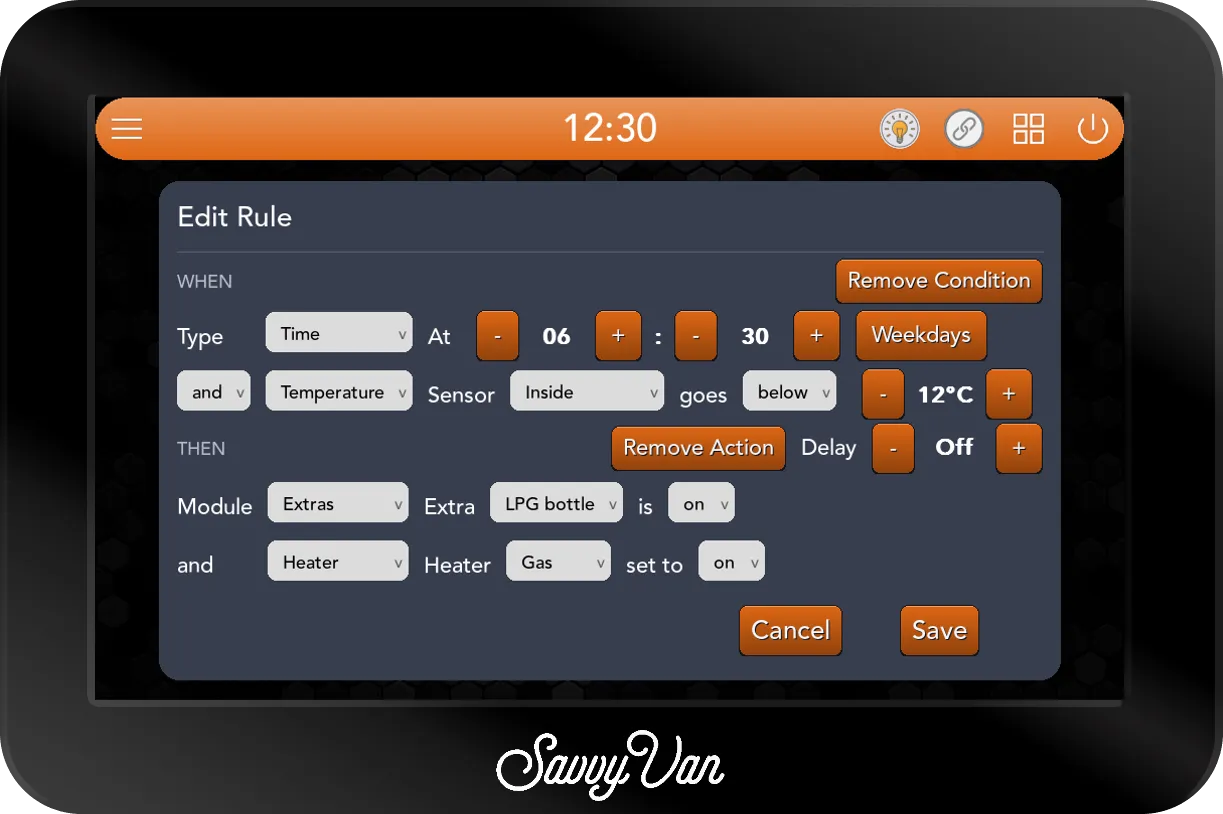
| Warm van for breakfast | At 06:30 on weekdays and Inside below 15°C | The heater to Auto |
| Waste warning | Gray Waste above 90% or Black Waste above 80% | Three long beeps, and a message to acknowledge |
| Heater fault alarm | The heater’s fault is present | A message to acknowledge, and a long beep |
| Quiet hours | At 22:30 every day | Every light down to 30% at most |
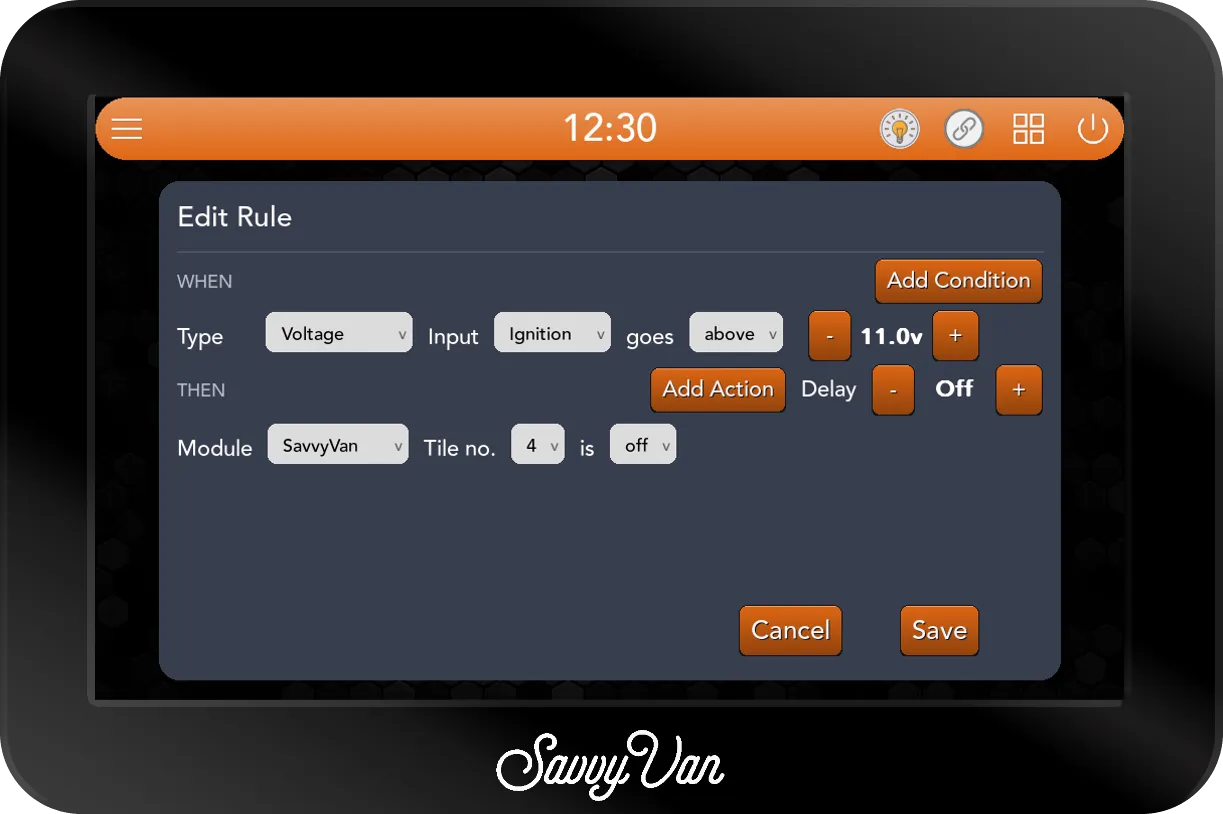
| Driving | The ignition input goes above 11.0V | The inverter’s tile off |
| Gas off at night | At 23:00 every day | The LPG bottle off |
Before you start
The options on the card follow the van. The editor only offers what the panel can reach at that moment: Tank relay, Tank level and Tanks appear while SavvyTanks is connected, LED while SavvyLights is connected, Heater and Heater state while a Propex, Autoterm or Kartt heater is connected, Battery while a SavvyShunt or a battery the panel reads directly is connected, and Extras - the gas bottle - while SavvyTanks or a Propex is connected. If something you expect is missing, check its add-on is paired and powered first. A rule you have already saved keeps its choices even while its add-on is away, so it stays editable.
| To use | The van needs |
|---|---|
| Tile, Temperature (Inside, Outside), Voltage, Time | The panel on its own |
| Temperature, Water Heater | A temperature probe set to Water Heater in Additional Settings |
| Battery | A SavvyShunt, or a battery the panel reads directly |
| Tank relay, Tank level, the Tanks module | SavvyTanks |
| Extras - LPG level and the LPG bottle | SavvyTanks or a Propex add-on gauging or switching the gas |
| Heater, Heater state | A Propex, Autoterm or Kartt heater, with its model chosen in Heater Settings |
| The LED module | SavvyLights |
| Buzzer, Notification, Error dialog | The panel on its own |
Three set-up details make rules easier to build and to read back later:
- Know your tile numbers. Rules name the panel’s eight switched circuits by number, Tile no. 1 to 8 - the same number Tile Settings shows as Tile No. for each tile. The list writes them as Tiles 5, so jot down which number is which before you start.
- Name your temperature probes’ locations. A Temperature rule watches a location - Inside, Outside or Water Heater - which is whatever probe is set to that location in Additional Settings.
- Set the clock. Time rules follow the time on the top bar, which is set under Display & Sound. A panel on the wrong time runs its rules at the wrong time.
The Logic Rules page
Open Installer Settings, enter the installer passcode, and tap Logic Rules - the sixth icon on the first screen. The page lists every rule on the panel, newest first, each written as a sentence:
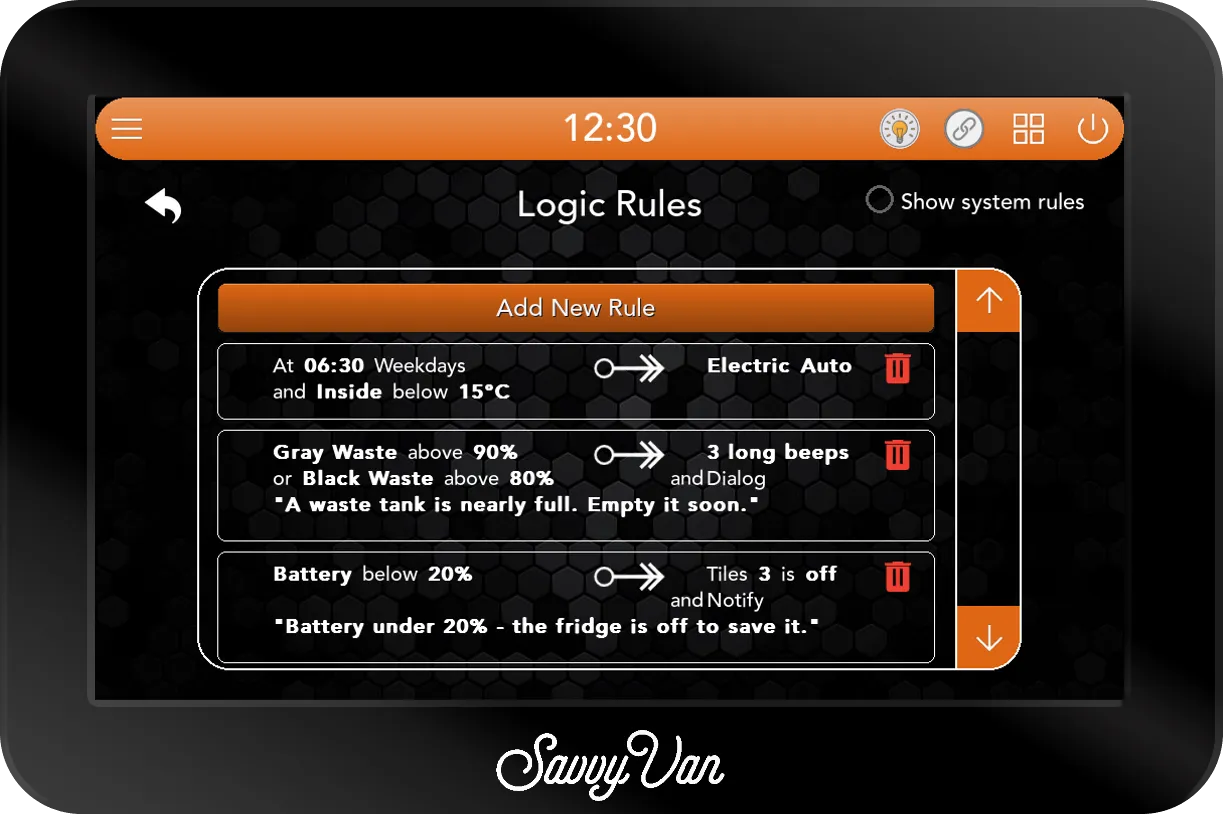
- Reading a rule. The conditions are on the left, what it does is on the right of the arrow. A second or third condition starts its line with and or or; a second or third action with and. A wait reads as after and the time, on a line of its own. A notification or dialog shows Notify or Dialog, with its message in quotes underneath.
- Add New Rule opens a blank card.
- Tap a rule to open it again as Edit Rule, filled in with what it does now.
- The red delete icon removes a rule. It goes straight away, with no question first.
- Show system rules, top right, adds the rules the panel keeps for itself - see System rules below.
There is no switch to turn a rule off for a while. A rule exists, or it is deleted.
Building your first rule
Tap Add New Rule. A card opens headed Add Rule, already holding the simplest rule there is - when tile 1 is on, tile 1 is on - for you to change:
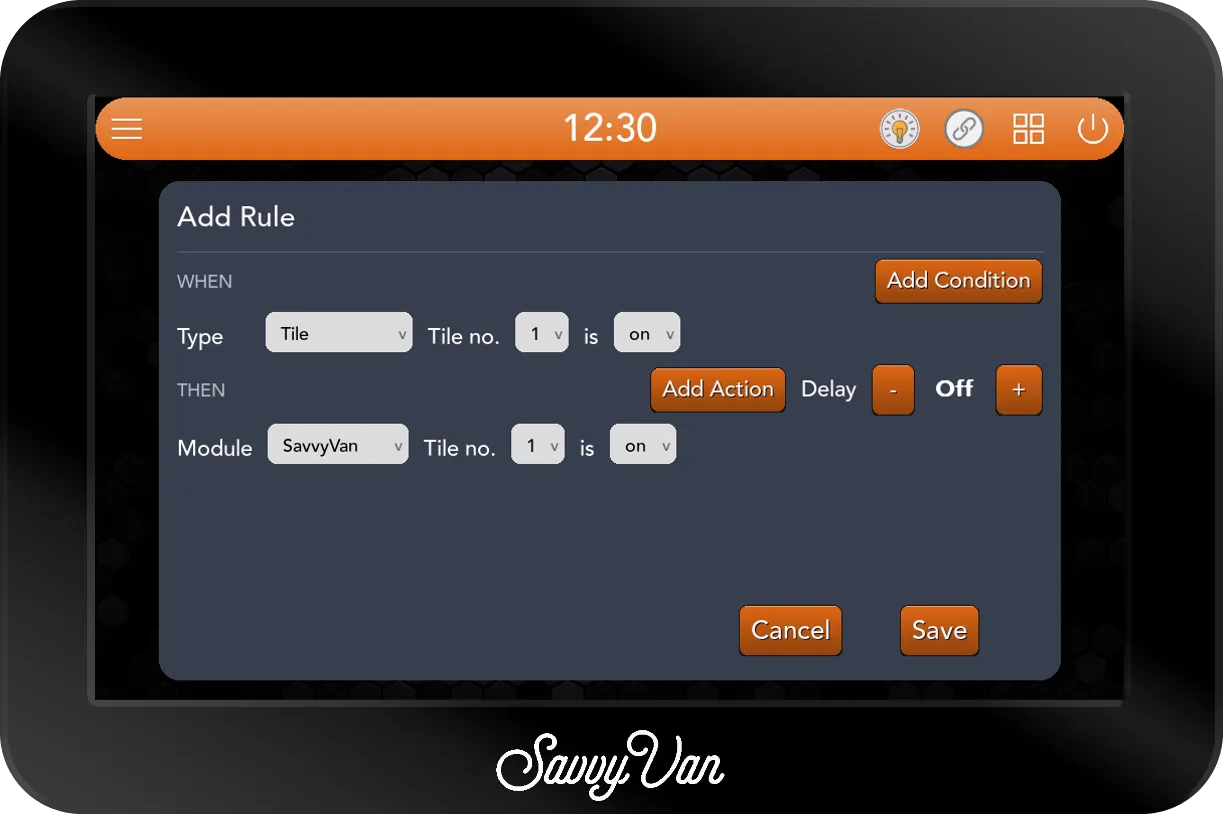
Here is the frost rule, built from that card - when the van drops below 3°C, put the tank heater on (tile 5, on this van):
- Under WHEN, tap the Type dropdown and choose Temperature. The row changes to Sensor, goes, and a figure with - and + either side.
- Set Sensor to Inside, goes to below, and tap - until the figure reads 3°C.
- Under THEN, leave Module at SavvyVan, set Tile no. to 5, and leave it is on.
- Tap Save. The panel says New Logic Rule Added. and the rule is at the top of the list, working straight away. Cancel throws the card away.
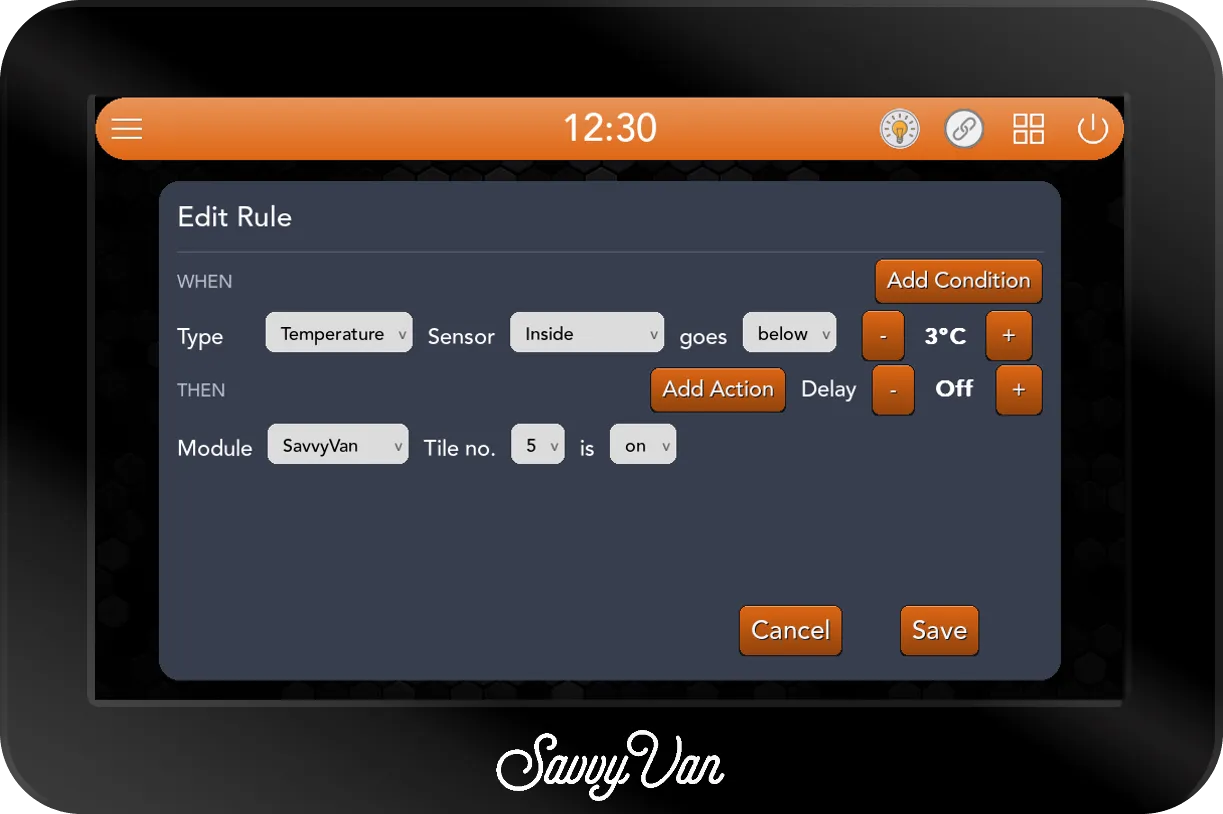
To change a rule later, tap it in the list. The same card opens as Edit Rule, and Save says Logic Rule Updated.
A frost rule only puts the heater on. To have it go off again once the van has warmed up, add a second rule: Inside goes above 6°C, tile 5 off. Leave a gap between the two figures, as here, so the two rules are not answering each other every few minutes.
WHEN: what a rule can watch
Tap the Type dropdown under WHEN. On a van with every add-on connected, it offers all ten:
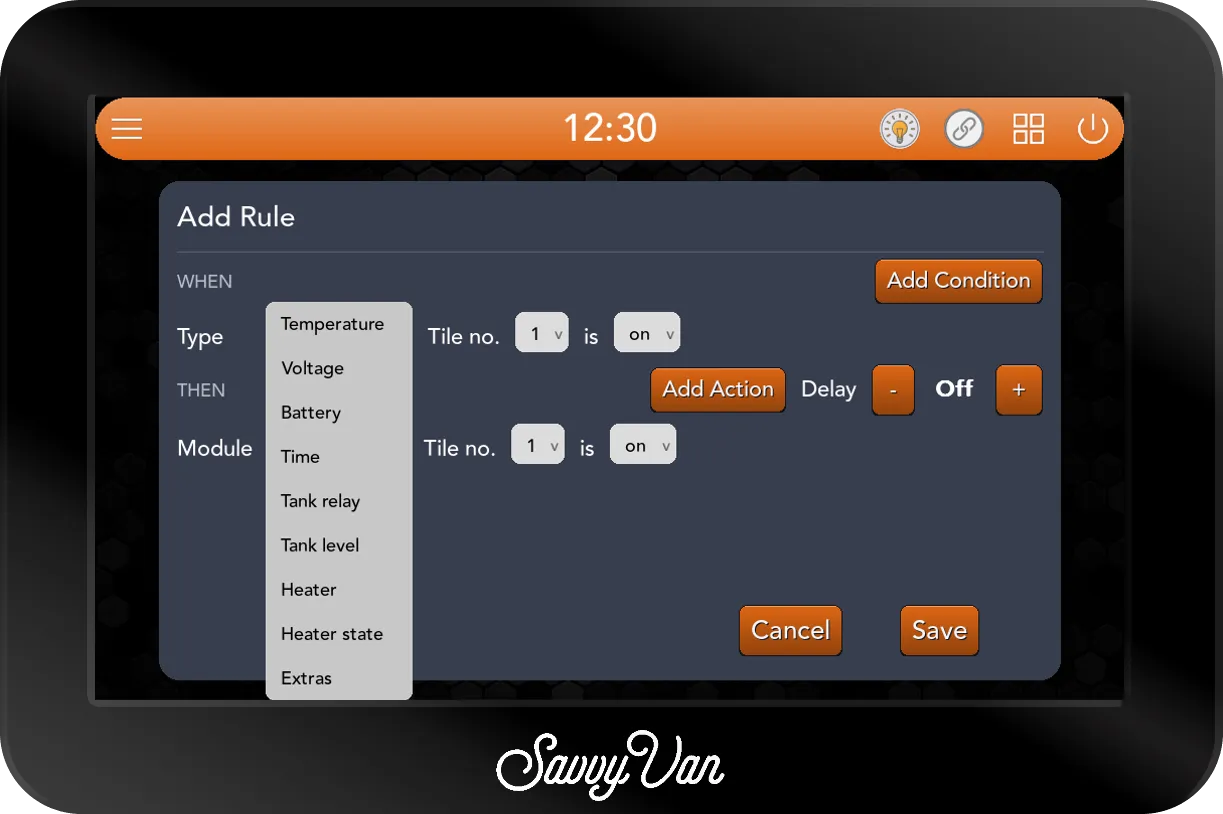
| Type | What you set | How it sets the rule off |
|---|---|---|
| Tile | Tile no. 1 to 8, is on or off | The moment that tile is switched that way, however it was switched |
| Temperature | Sensor Inside, Outside or Water Heater, goes above or below a figure from -20°C to 50°C, a degree at a time | As the reading crosses your figure |
| Voltage | Input Onboard or Ignition, goes above or below a figure from 8.0V to 16.0V, a tenth of a volt at a time | As the reading crosses your figure |
| Battery | Battery goes above or below a state of charge from 0% to 100%, 5% at a time | As the percentage crosses your figure |
| Time | At an hour and minute - the hour a step at a time, the minutes five at a time - and the days of the week | Once, in that minute, on each day you chose |
| Tank relay | Relay S1 (Gas), R1 or R2 is on or off | The moment that SavvyTanks relay switches that way |
| Tank level | Tank - Fresh Water, Gray Waste or Black Waste - goes above or below a level, 5% at a time | As the level crosses your figure |
| Heater | What the heater has been set to - a source, and on, off, Auto or a level | The moment the heater is set to it, from any route |
| Heater state | What the heater is doing: the burner, the fan or the electric element running or stopped, or a Fault present or cleared | The moment the heater starts or stops doing it |
| Extras | LPG level goes above or below a level, 10% at a time, or the LPG bottle is on or off | As the level crosses your figure, or the moment the bottle is switched |
A few of these deserve a closer look.
Voltage: Onboard and Ignition. Onboard is the leisure battery the panel measures itself; Ignition is the panel’s second voltage input, the one the home screen’s Vehicle dial shows. Ignition is always measured, so a rule on it works on any van with that input wired. Onboard is only measured on a van whose battery the panel reads by voltage - Shunt Type set to Voltage Sensor with Enable Battery ticked in Battery Settings. On a van with a SavvyShunt or a battery the panel reads directly, a rule on Onboard never sets off; use Battery there instead.
Battery. The battery’s state of charge, as the battery dial shows it. It needs a SavvyShunt or a battery the panel reads directly. If the battery stops reporting for a minute, a Battery rule treats that as no reading at all, rather than acting on the last figure it heard.
Time. A Time condition is a moment, not a stretch of time: it sets the rule off once, in the minute you name, on the days you choose. If the panel is off or restarting during that minute, that day’s turn is missed and not made up later. The days are set with the button at the end of the row - see Days of the week.
Tank level and Extras. Tank level lists the tanks you have set up in Tanks Settings, by their type. The gas tank is not in that list: it lives under Extras, as LPG level, because the panel treats the gas bottle as one thing whichever add-on measures it - SavvyTanks or a Propex add-on. LPG bottle under Extras is the gas switch, whichever add-on switches it.
Heater and Heater state. These two sound alike and are not. Heater is what somebody chose - the heater being set to Gas, Electric level 2, Diesel Auto, or off - from the Heater page, the schedule, a SavvyDot, the phone app or another rule. Heater state is what the heater is actually doing - its burner running, its fan stopped, a fault appearing. There is more in Heating with rules.
THEN: what a rule can do
Tap the Module dropdown under THEN. On a van with every add-on connected, it offers all eight:
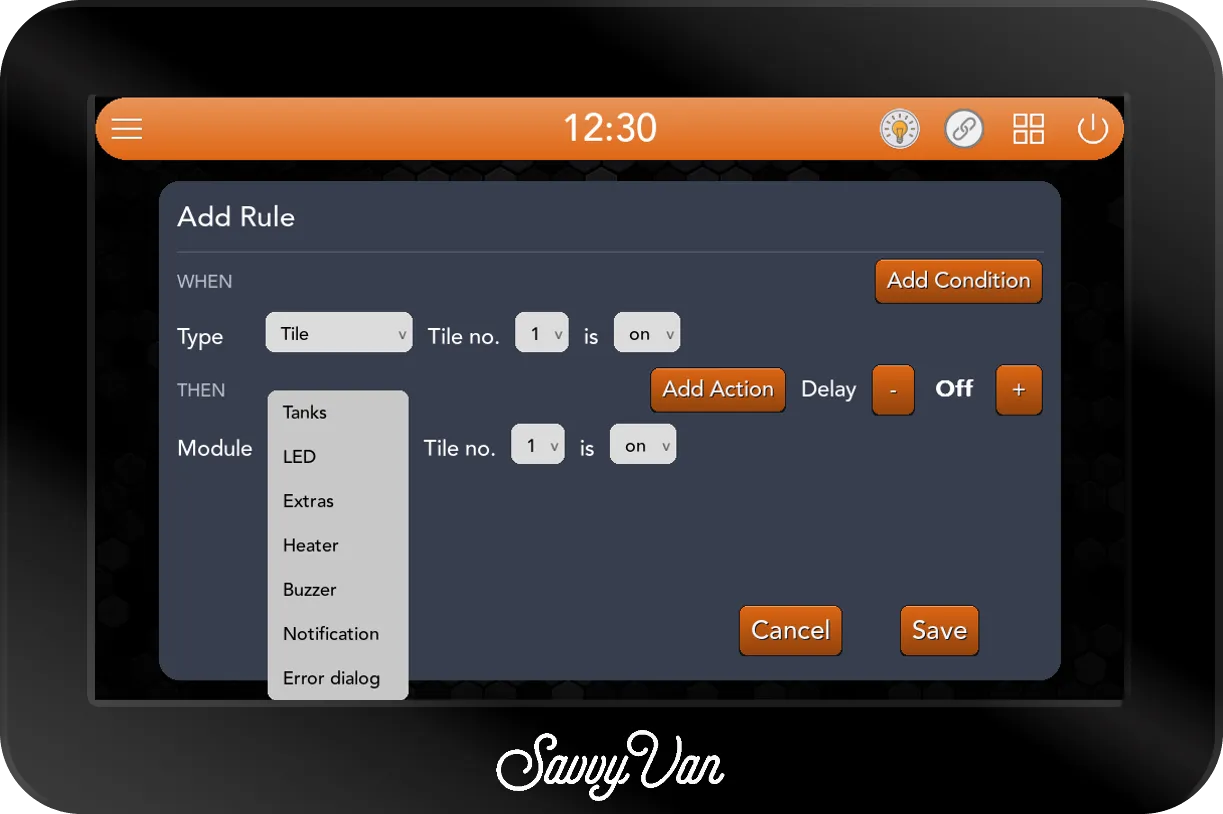
| Module | What you set | What it does |
|---|---|---|
| SavvyVan | Tile no. 1 to 8 is on or off | Switches one of the panel’s eight circuits to on or off. A tile already there is left alone |
| Tanks | Relay S1 (Gas), R1 or R2 is on or off | Switches one of SavvyTanks’ relays. S1 is the gas solenoid - see Gas |
| LED | Light - All lights or one light by name - is on, off, a saved scene, or Max brightness | On is half brightness. A scene is put on as it is saved now, not as it was when you wrote the rule, and always applies to every light. Max brightness, with All lights, turns down any light brighter than the figure you set |
| Extras | LPG bottle is on or off | Opens or closes the gas bottle - see Gas |
| Heater | Heater, a source, set to on, off, Auto or a level | Sets the heater exactly as a press of that button on the Heater page would - see Heating with rules |
| Buzzer | Sound Short beep, Long beep or 3 long beeps | Sounds the panel’s buzzer - even with Enable Tap Sounds unticked in Display & Sound |
| Notification | Message | Pops your message up on the screen, titled Logic rule, and keeps it on the Notifications page |
| Error dialog | Message | Wakes the screen and shows your message full screen, with Logic rule under it and an I Understand button that must be pressed to clear it |
Writing a message. For a Notification or an Error dialog, tap Set message. A box headed Enter the message to show. opens with the on-screen keyboard; type your message, up to 120 characters, and tap Save. The button then shows the start of your message. Write it for whoever will be standing in front of the panel - say what has happened and what to do, as in A waste tank is nearly full. Empty it soon.
Alerts stay on the panel. A beep, notification or dialog appears on the panel only - not on the phone app or a SavvyDot. And each one is sounded or shown at most once every 30 seconds, so a rule that keeps setting off cannot turn into a constant alarm.
More than one condition: and, or
Add Condition, at the right of WHEN, adds a second condition row, and again for a third. Remove Condition takes the last one away. The small dropdown at the start of the second row chooses how they join - and or or - and the one word applies to the whole rule; change it on any row and every row follows.
And: everything at once
With and, the rule acts at the moment all its conditions are true together - whichever of them came true last. Here is the warm van for breakfast:
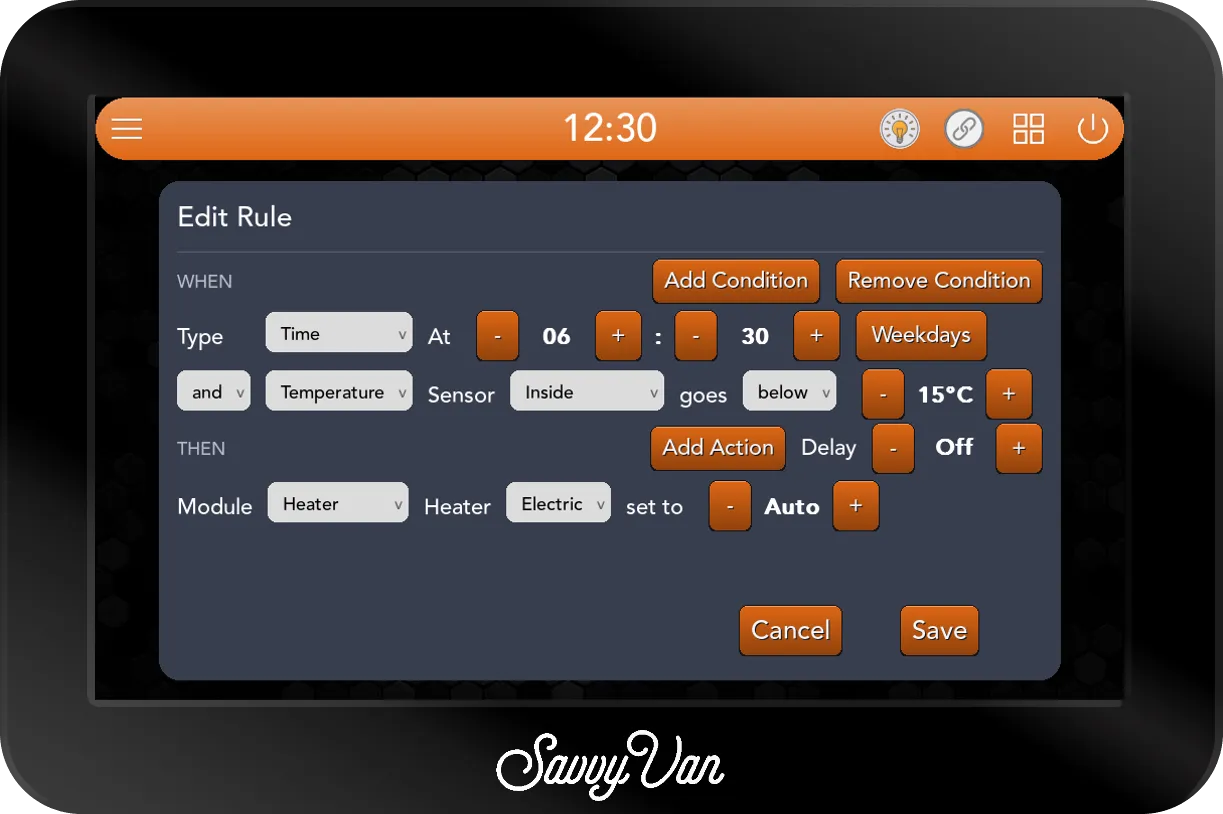
How each condition behaves inside an and matters:
- A reading - a temperature, voltage, level or percentage - counts while it is past your figure. So at 06:30, the rule looks at the inside temperature: if it is below 15°C, the rule acts.
- A time counts only during its own minute. If the van is 16°C at 06:30 and drops to 14°C at 06:45, this rule does not act - 06:30 has gone. That is usually what you want: a morning rule that fires at teatime would be a surprise.
- A tile, relay, bottle or heater counts while it is in the state you chose. So the extractor is on and Inside goes above 25°C acts when the van warms up past 25°C with the extractor already on - and when the extractor is switched on in a van that is already over 25°C.
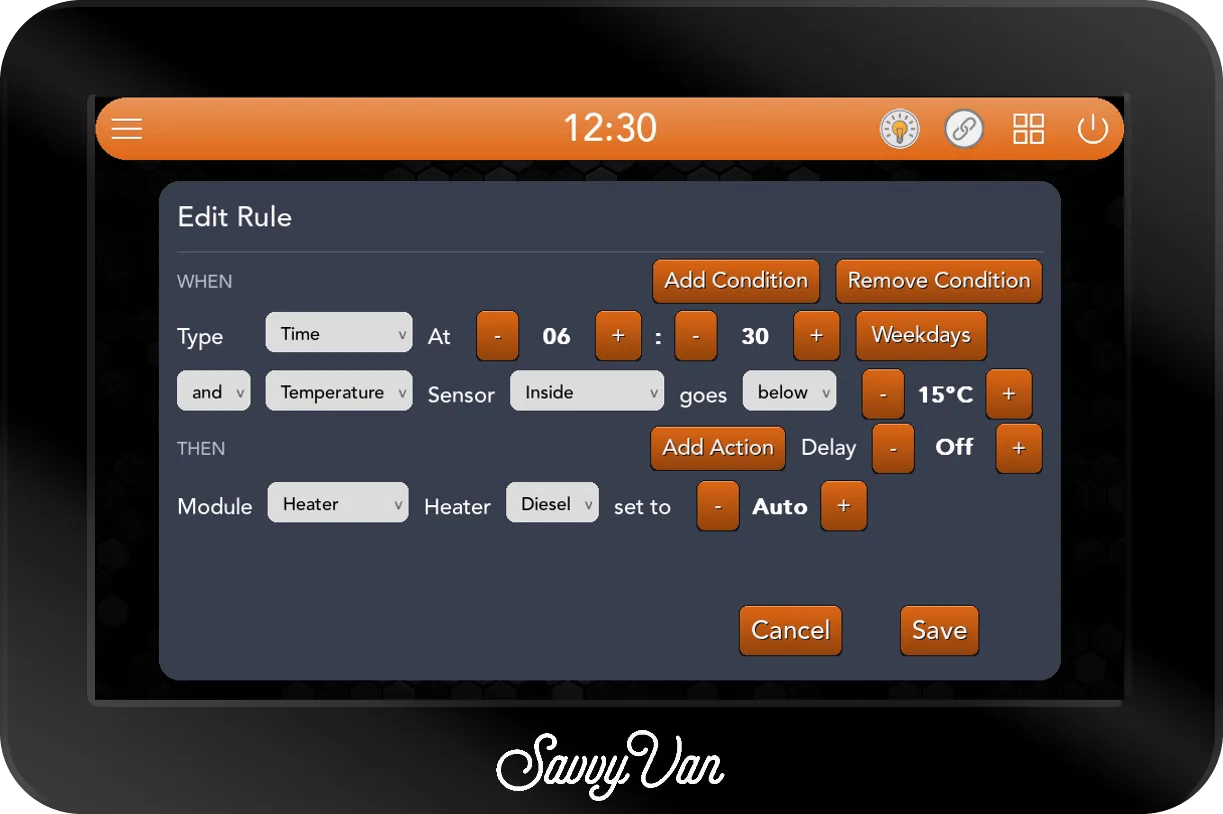
The same morning rule on a diesel van, with an Autoterm heater, reads Diesel and Auto instead:
Or: any one of them
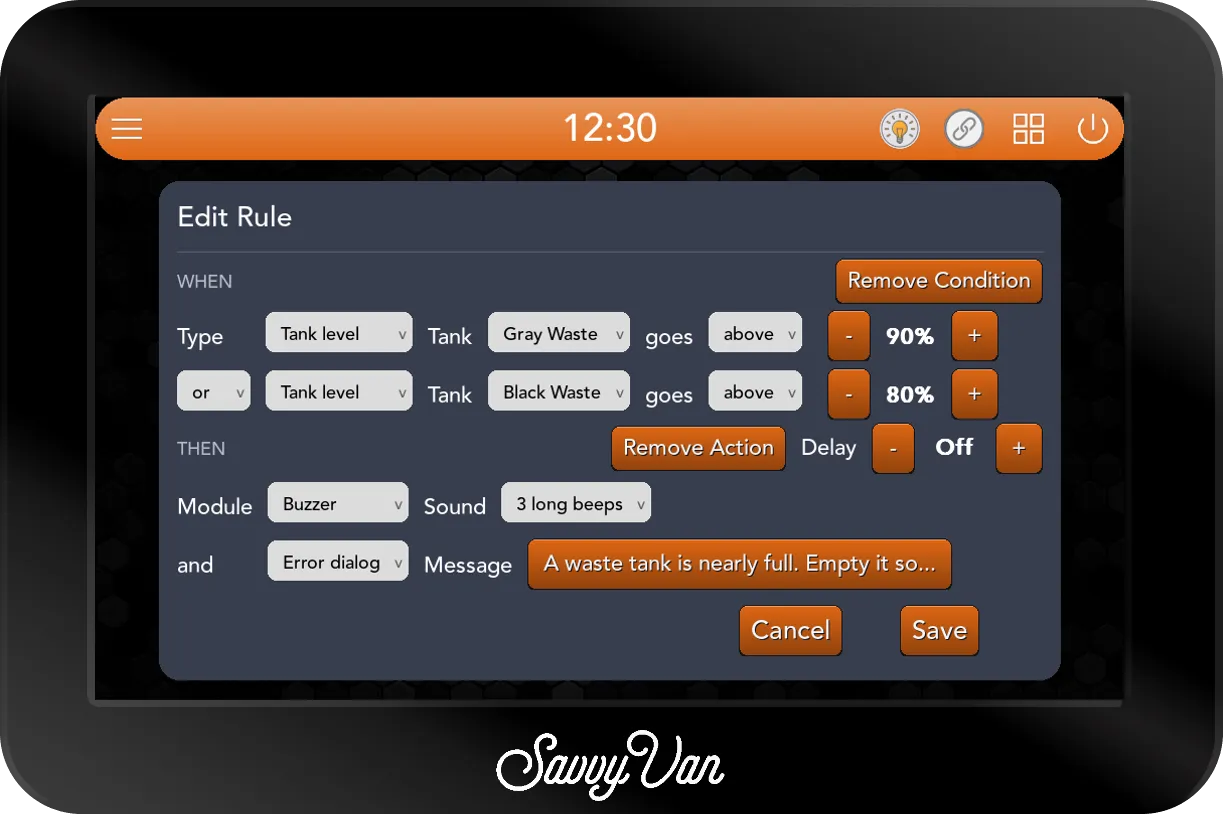
With or, the rule acts when any of its conditions comes true. It is the same as writing two or three rules with the same action, kept on one line:
How many rows fit
A card holds four rows between WHEN and THEN, conditions and actions together, and three of either at most: three conditions and one action, two and two, or one condition and three actions. Add Condition and Add Action disappear when there is no room for another row - the waste warning above has two of each, which is why neither button is showing.
More than one action
Add Action, on the THEN line, adds a second action row, and again for a third. Remove Action takes the last one away. Every row after the first starts with and, and the actions are carried out in order, top to bottom, each time the rule acts.
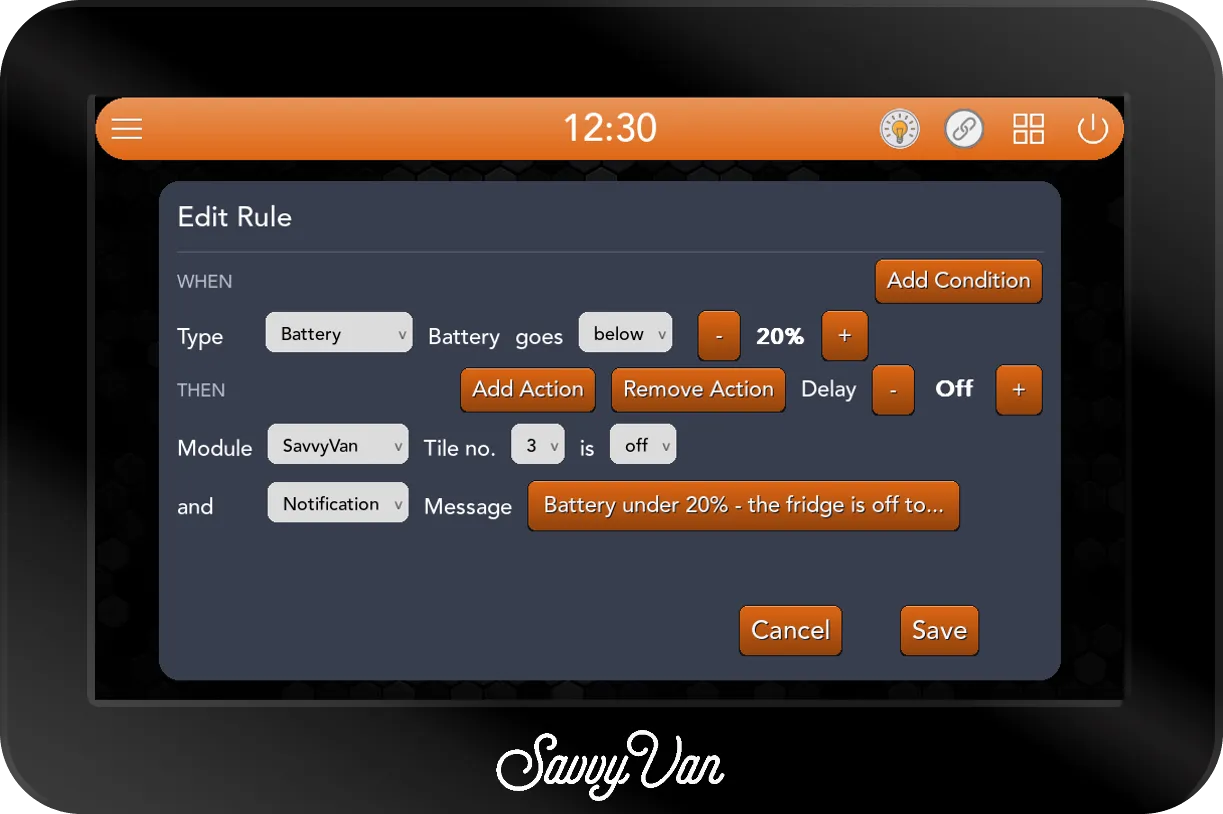
Each action must do something different. Two actions on the same tile, relay, light or heater source would undo each other, so Save refuses them with You must use a different target for each action.
Waiting first: the Delay
Delay, on the right of the THEN line, makes the rule wait before it acts. Tap + and - to step through Off, 1, 2, 5, 10, 15, 30 and 45 minutes, then 1 hour, 1 hour 30, and 2, 3, 4, 5, 6 and 8 hours.
A delayed rule does three things a plain one does not:
- It checks again before acting. When the wait is up, the rule acts only if its conditions are still true. Switch the extractor off by hand before its two hours are up, and the rule has nothing to do.
- It starts the count again each time it is set off. If the extractor is switched off and on again after an hour, the two hours count from the second switch-on.
- It may act on what it watches. Without a delay, a rule cannot switch the tile, relay or bottle it is watching - You must use separate Tiles for a new rule. With a delay it can, which is what makes an auto-off rule possible:
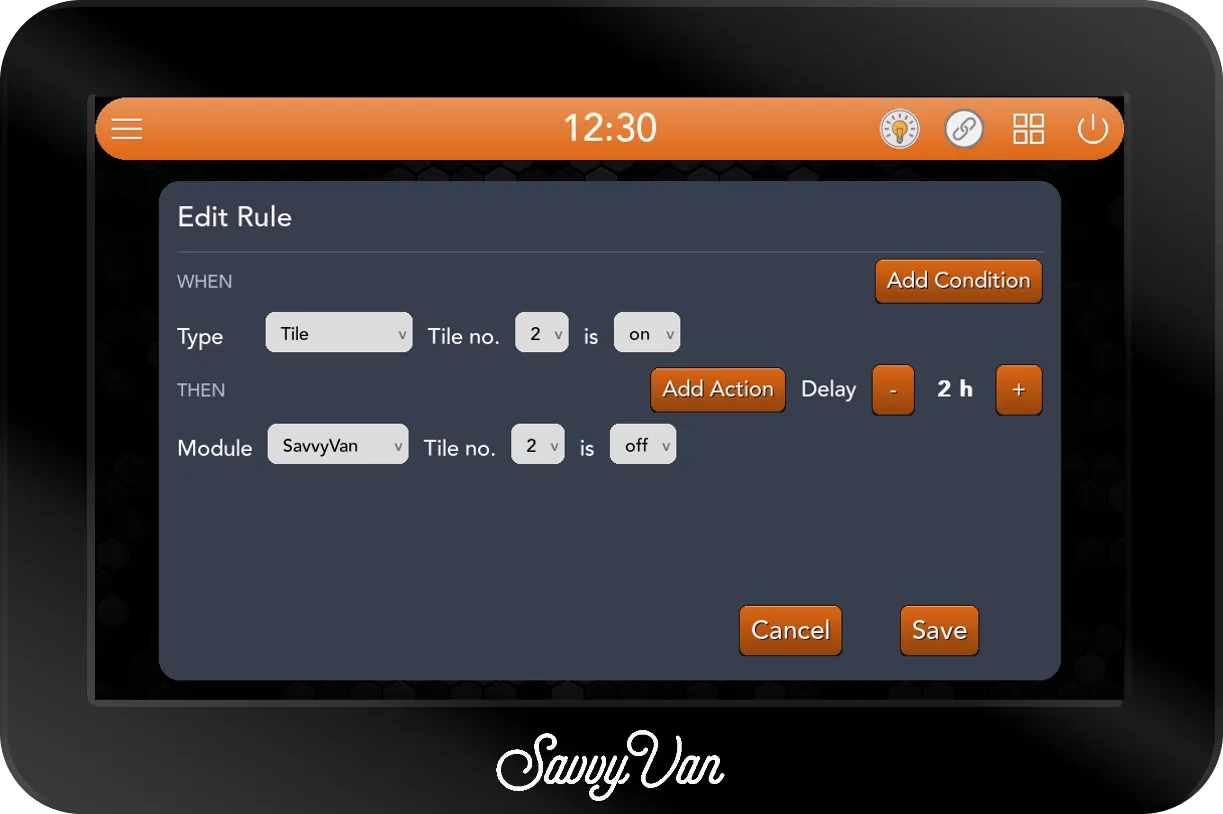
In a delayed rule, a Time condition counts as still true when the wait is up - its minute has been and gone, and that is the point.
If the panel restarts in the middle of a wait, the count starts again from the restart - as long as the rule’s conditions are still true then.
Days of the week
A Time condition ends with a button showing its days - Every day to begin with. Tap it to choose:
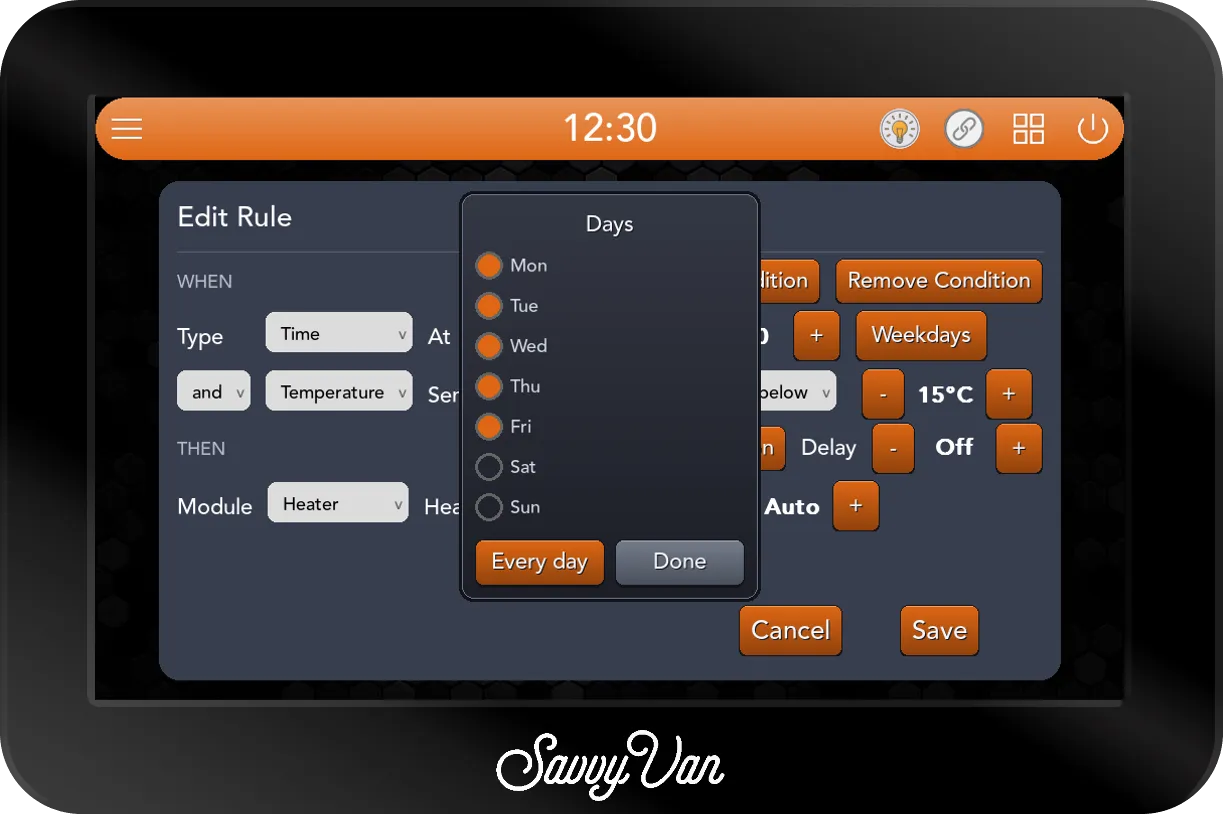
The button then names your choice as briefly as it can: Every day, Weekdays, Weekends, up to three day names such as Mon Tue Fri, or the days left out, such as Not Sun. A time with no days ticked would never run, so Save refuses it with Tick at least one day for the time condition.
When a rule acts
Rules act on their own, so it pays to know exactly when. These are the rules the panel follows:
Readings act as they cross, then wait to come back. A temperature, voltage, tank level, LPG level or battery rule acts once, as the reading crosses your figure. It cannot act again until the reading has come back the other side of your figure by a small margin:
| Reading | Comes back by |
|---|---|
| Temperature | 0.5°C |
| Voltage | 0.2V |
| Tank level and LPG level | 5% |
| Battery | 2% |
So a probe hovering on 3°C does not switch the tank heater on and off every few seconds, and switching something back by hand sticks.
A reading already past the figure acts straight away. When the panel starts, and whenever any rule is saved or edited, a reading rule whose condition is already true acts on the first reading. A frost rule acts on a van that wakes up cold.
Switches act on the change, not the state. A Tile, Tank relay, LPG bottle, Heater or Heater state condition acts at the moment the thing changes - not because it happens to be on when the panel starts.
Rules follow every route. A tile switched on the panel, from the phone app, from a SavvyDot or by another rule sets off the same rules. The one exception is the low voltage cut-off: tiles it switches off to protect the battery do not set rules off.
Rules set, they do not flip. A rule switches a tile to on or off. If the tile is already there, nothing happens. A SavvyTanks relay or the gas bottle whose state the panel cannot read at that moment is left alone rather than switched blind.
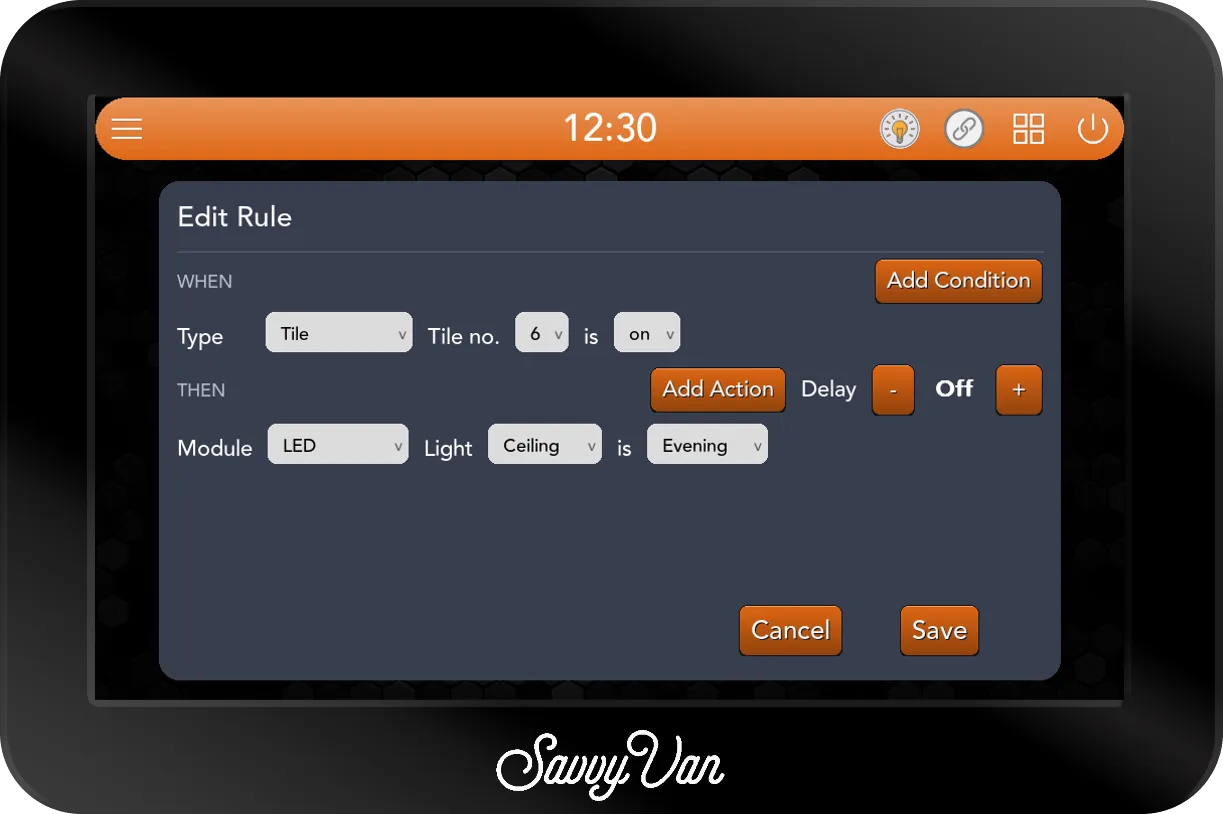
Rules can set off other rules. One rule’s action can be the next rule’s condition: switch tile 4 and a rule switches tile 6, which another rule is watching to put an evening scene on. That is useful, and it means two rules can also set each other off and back for ever.
Heating with rules
On a van with a Propex, Autoterm or Kartt heater, rules can watch the heater and set it. A Kartt has the same buttons as an Autoterm, so read Autoterm for it below. Choose the heater’s model in Heater Settings first - without one, the card says Choose a heater model in Heater Settings first.
The sources are the Heater page’s buttons, so they depend on the model:
| Heater model | Sources, and what each can be set to |
|---|---|
| HS2000E | Fan on or off; Gas on or off; Electric off, Auto, 1, 2 or 3 |
| HS2000 | Fan on or off; Gas on or off |
| Propex (electric only) | Fan on or off; Heater off, Auto, 1, 2 or 3 |
| Autoterm | Fan off or 1 to 10; Diesel off, Auto, or 1 to 10 |
Auto is only offered where the Heater page has it: on the electric element with Enable Auto Electric Mode ticked in Heater Settings, and on an Autoterm with Enable Auto Heat Mode ticked. The Propex gas burner has no Auto setting.
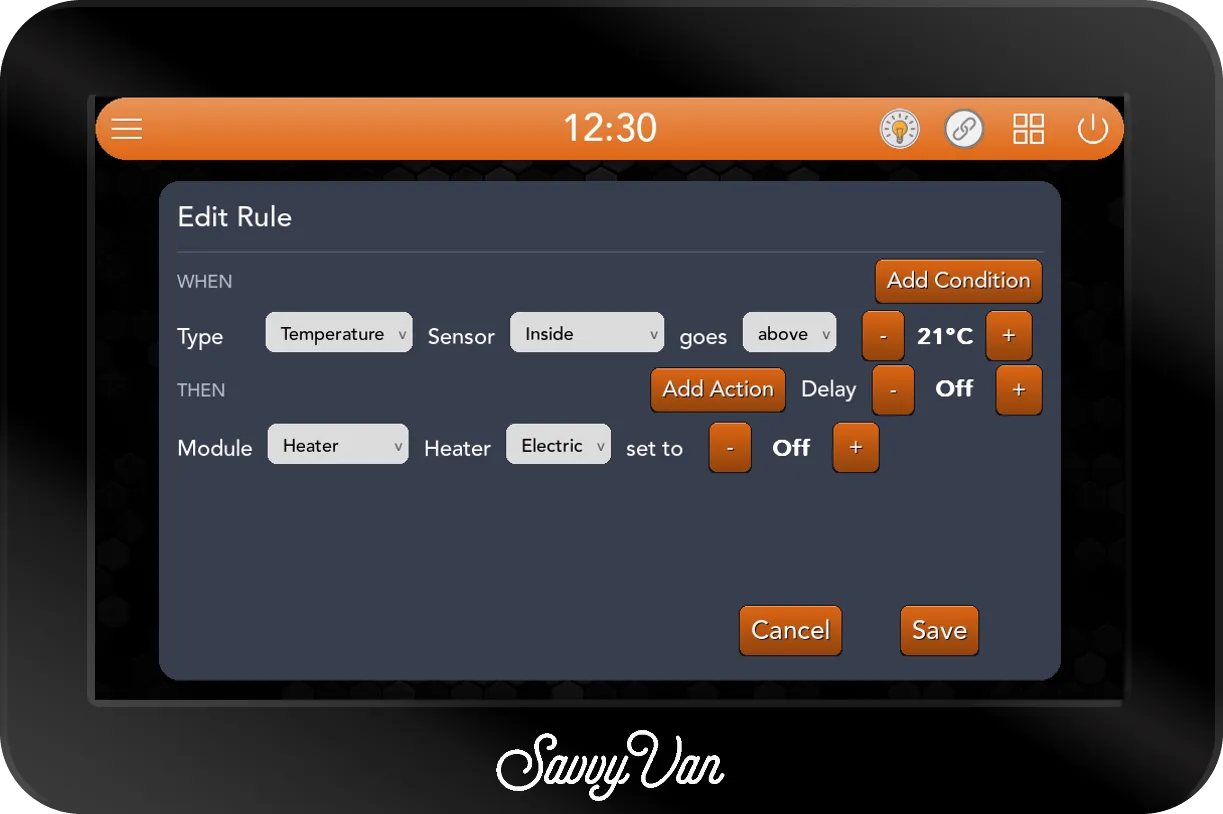
As an action, Heater sets the heater just as a press of that button on the Heater page would, so the buttons light up as if you had pressed them. On Auto, the heater then works to the target temperature set on the Heater page; on a level, it runs at that level. Set to off switches that source off if it is the one running, and leaves the heater alone if it is not:
As a condition, Heater acts when the heater is set to your choice, from any route - the Heater page, the schedule, a SavvyDot, the phone app or a rule. Set to off acts when the heater leaves that source, whether to off or to another source. Heater state acts on what the heater is doing:
- Gas or Diesel running - the burner has been called on. It counts from the moment the burner is asked for, before the flame is confirmed.
- Fan running or stopped, and Electric running or stopped (on a Propex electric only model, Heater).
- Fault present - the heater has reported a fault - or cleared.
A heater fault already puts its own message on the screen. A rule adds what you want on top - the buzzer, or a dialog that will not be missed:
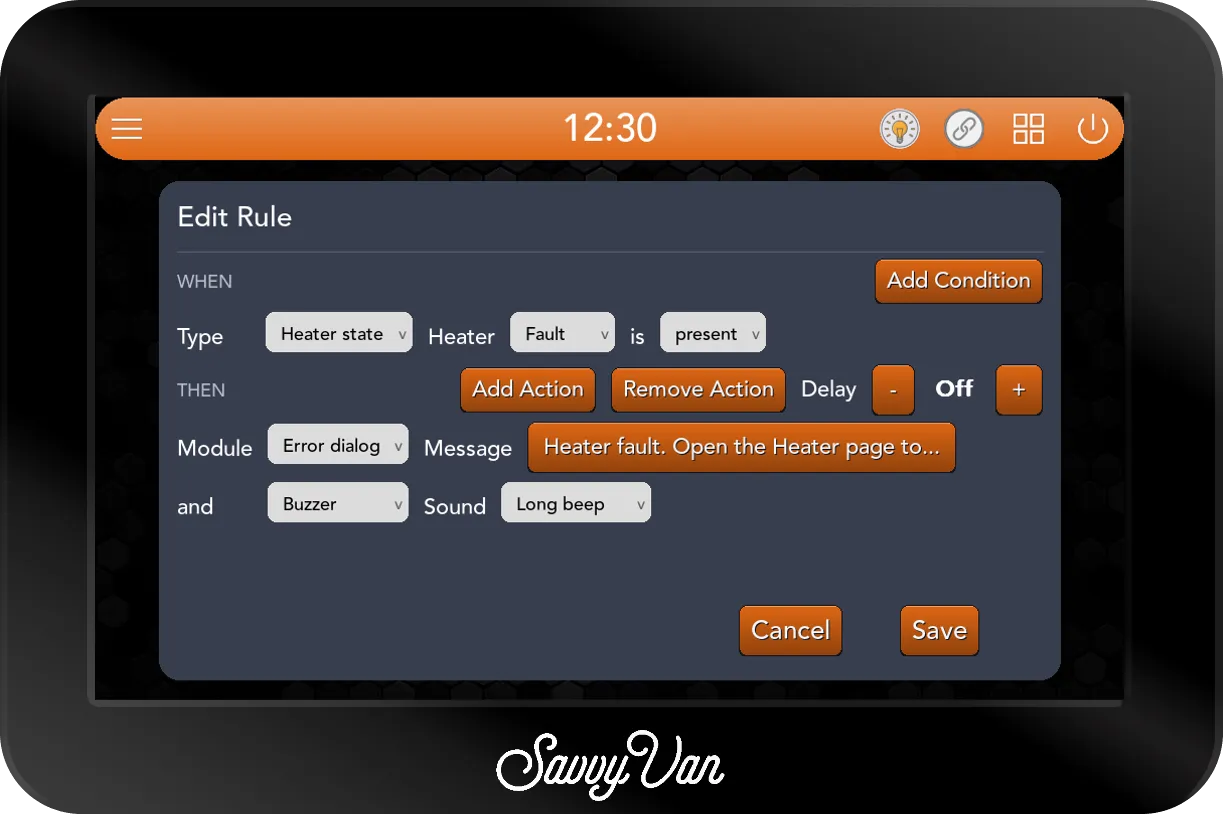
A rule cannot set the heater and watch the same source at once - You must use a different heater source for a new rule. - since the two would answer each other.
Gas: rules that open and close the gas
A rule can open and close the gas, three ways:
- Extras → LPG bottle is on or off - the gas bottle, however it is switched: the solenoid on a Propex add-on and SavvyTanks’ S1 (Gas) relay are both driven, whichever the van has.
- Tanks → Relay S1 (Gas) is on or off - SavvyTanks’ gas relay on its own.
- Heater → Gas set to on or off - the Propex gas burner.
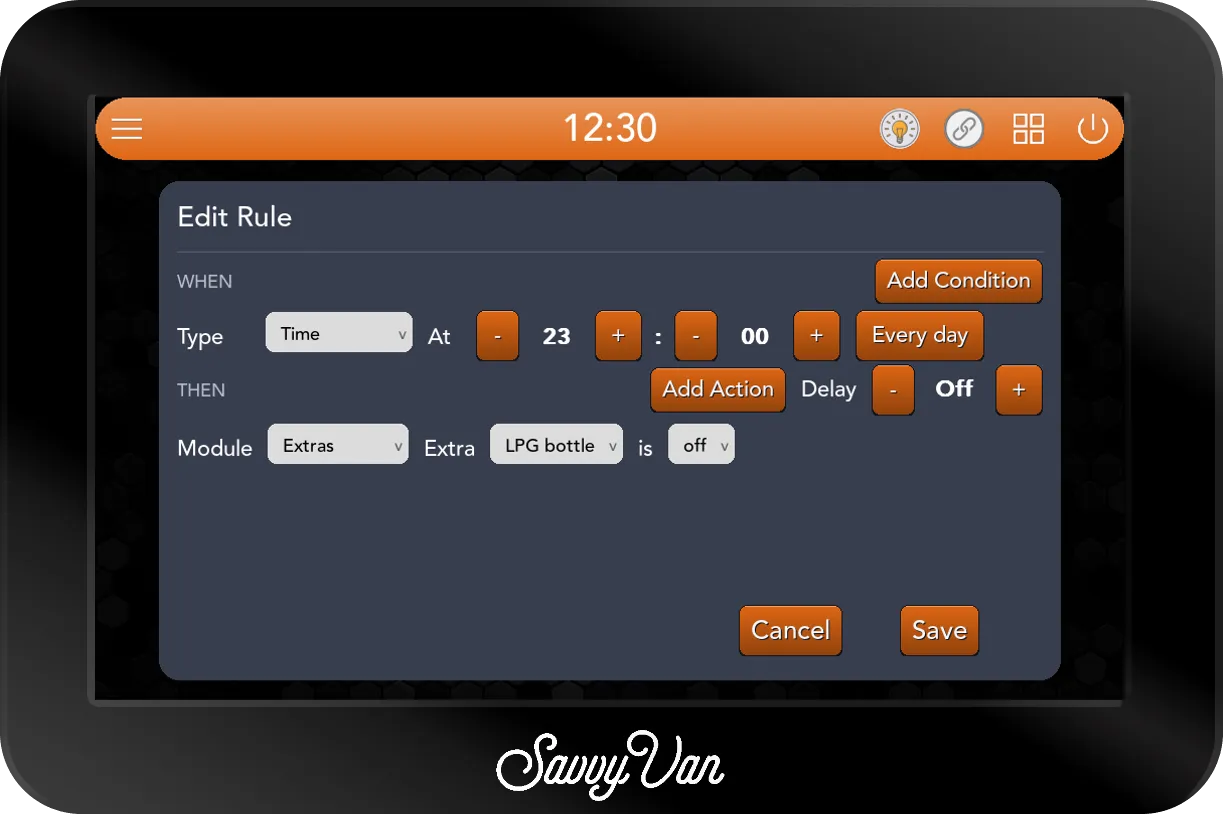
Closing the gas is the safe direction, and the one most vans want - the bottle shut overnight, whatever was left open:
Opening the gas. Setting the heater to Gas does not open the bottle by itself. With Enable Auto Gas Mode ticked in Heater Settings, the panel opens the bottle whenever the burner is called and closes it when the burner stops - see System rules. Without it, a rule that lights the gas burner should open the bottle too, as its first action:
A rule that sets Gas on with the bottle closed leaves the burner called with no gas to burn, as pressing the button would.
Watching the gas carries none of these risks: an Extras → LPG level rule that puts up a notification when the bottle drops below 20% is a good one for any van.
Lights
With SavvyLights connected, the LED module puts on a scene, switches one light or all of them, or turns the brightness down:
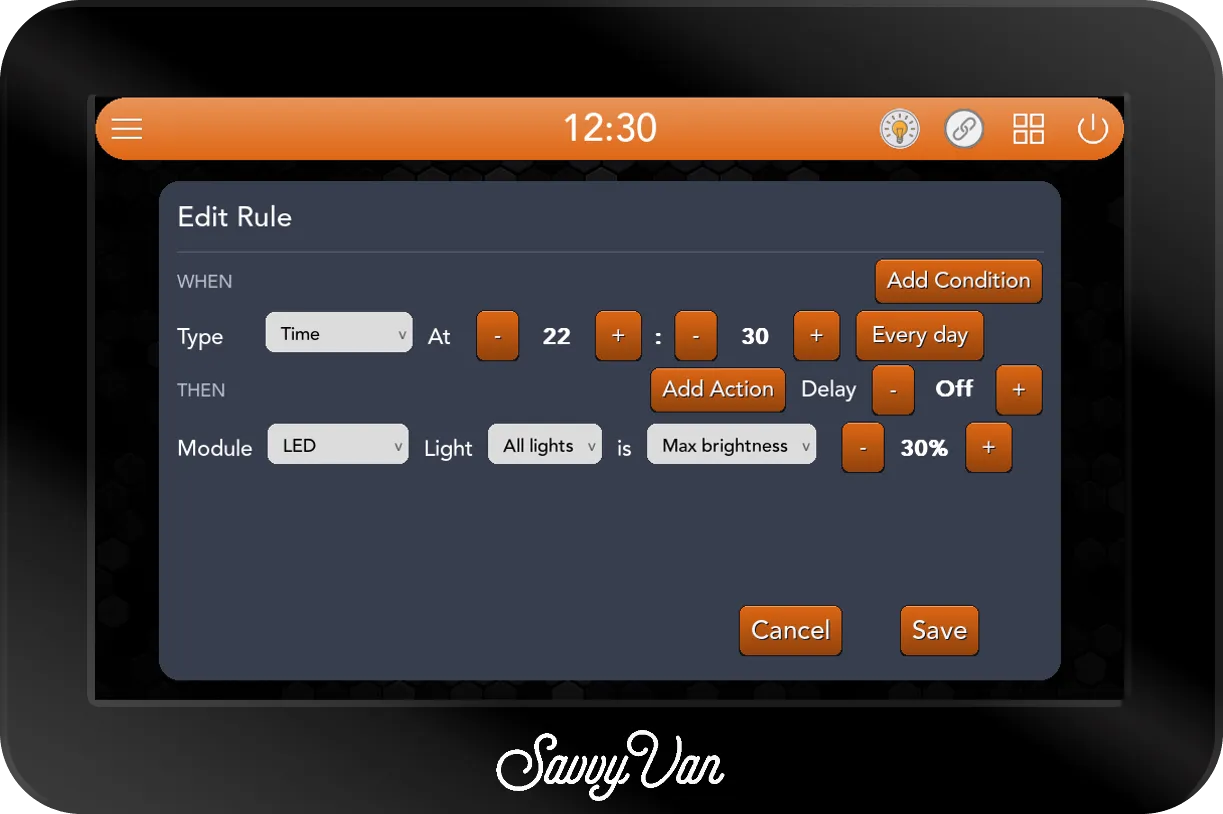
- On puts a light on at half brightness; off puts it off.
- A scene is put on as it is saved on the Lights page now - change the scene and the rule follows.
- Max brightness, offered with All lights, is a ceiling applied once, when the rule acts. It is not a limit on what anybody sets later.
Driving and parked
With the second voltage input wired to a switched ignition feed, Voltage on Ignition tells the panel whether the engine is on. On an ignition wire the reading sits near 1.3V with the key out and near the vehicle’s voltage with it in:
System rules
Two settings pages now do their work through rules the panel writes for itself. Tick Show system rules on the Logic Rules page to see them:
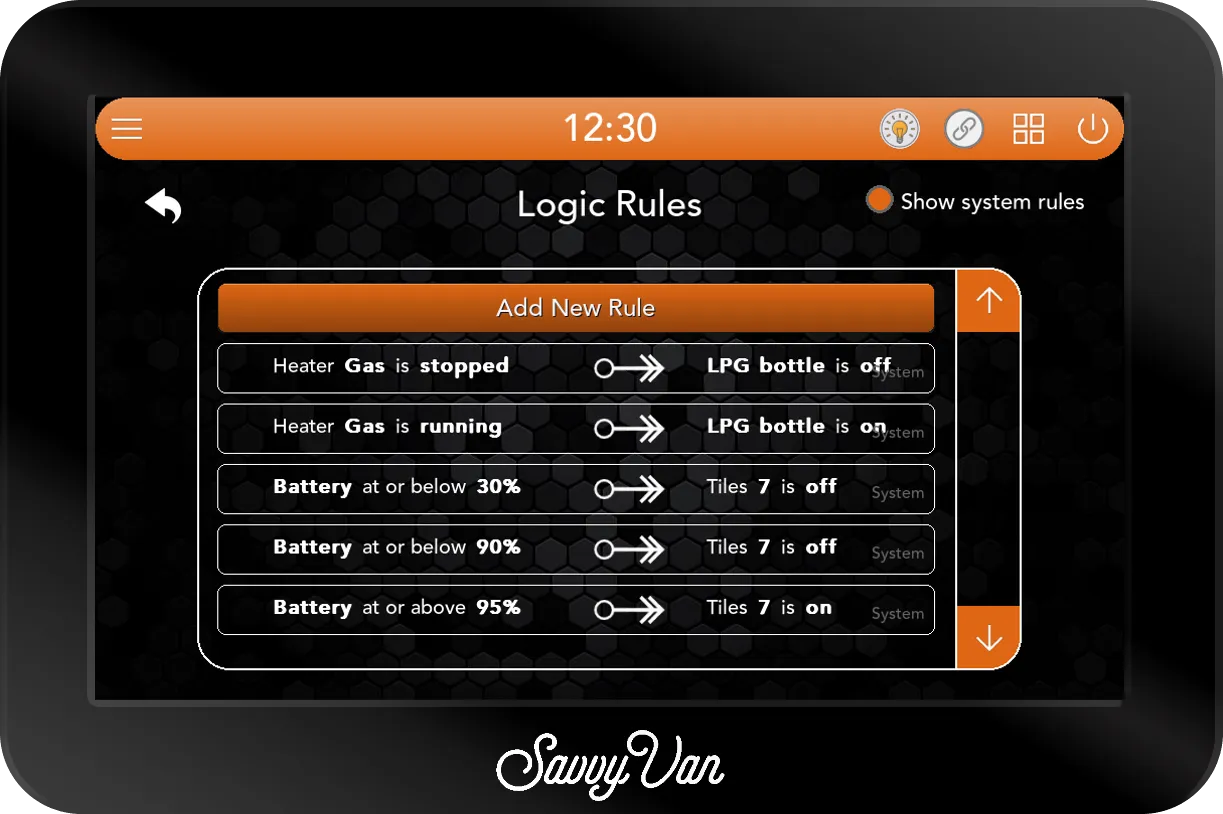
- Enable Auto Gas Mode, in Heater Settings on an HS2000E or HS2000, is two rules: when the gas burner is running, the LPG bottle on; when it has stopped, the bottle off. The bottle follows the burner’s changes only, so a bottle opened by hand for the hob stays open until the burner next stops, and then closes with it.
- Water Heater Settings is a rule for each thing switched on there - the Auto off delay, the Schedule, Charge Overflow on at 95% and off at 90%, and the Auto Off battery protection - for the tile set to Water Heater in Tile Settings. They only appear while the water heater’s Enabled box is ticked.
A system rule has no delete icon and cannot be tapped to edit. To change or remove one, change its setting on its own page.
Rules worth copying
Every rule below is built on the same card. Bold is what you choose.
- Frost protection. WHEN Temperature, Inside, goes below 3°C, THEN SavvyVan, the tank heater’s tile on. A second rule: above 6°C, off.
- Never run the pump dry. WHEN Tank level, Fresh Water, goes below 10%, THEN SavvyVan, the water pump’s tile off.
- Extractor auto-off. WHEN Tile, the extractor on, THEN Delay 2 hours, SavvyVan, the same tile off.
- Save the battery. WHEN Battery goes below 20%, THEN SavvyVan, the fridge off, and Notification, Battery under 20% - the fridge is off to save it.
- Warm van for breakfast. WHEN Time, 06:30, Weekdays, and Temperature, Inside, goes below 15°C, THEN Heater, Electric (or Diesel) to Auto.
- Warm enough. WHEN Temperature, Inside, goes above 21°C, THEN Heater, the same source, Off.
- Waste warning. WHEN Tank level, Gray Waste, goes above 90%, or Black Waste goes above 80%, THEN Buzzer, 3 long beeps, and Error dialog, A waste tank is nearly full. Empty it soon.
- Heater fault alarm. WHEN Heater state, Fault is present, THEN Error dialog, your message, and Buzzer, Long beep.
- Lights with the door. WHEN Tile, the door light on, THEN LED, your evening scene.
- Quiet hours. WHEN Time, 22:30, Every day, THEN LED, All lights, Max brightness 30%.
- Driving. WHEN Voltage, Ignition, goes above 11.0V, THEN SavvyVan, the inverter off - and a second rule to put it back.
- Low gas. WHEN Extras, LPG level, goes below 20%, THEN Notification, Gas bottle under 20%. Time to change it.
- Gas off at night. WHEN Time, 23:00, Every day, THEN Extras, LPG bottle off.
What the owner sees
The owner reaches Logic Rules from User Settings too, and sees the same list - but with no Add New Rule, no delete icons, and no editing. They can tick Show system rules to see those as well. Rules are yours to set up and theirs to enjoy; if an owner wants to change them, give them the installer passcode or change them for them.
If the panel goes back to older software
Rules are kept with the panel’s settings, so they survive an update. If a panel is ever put back onto older software, a rule with several conditions, several actions or a delay is ignored rather than half carried out - an “and” rule acting on one of its conditions would be worse than not acting at all. It works again as soon as the panel is updated.
Troubleshooting
A Type or Module I want is not offered. Its add-on is not connected at that moment - see Before you start. Check it is paired and powered, and open the card again.
A rule never acts. Read it back in the list - it is written as a sentence, and a wrong word is easy to spot there. Then:
- A reading rule acts as the reading crosses your figure. If it was already past it when you saved the rule, it acts on the next reading; after that it waits for the reading to come back and cross again.
- A Time condition in an “and” rule only counts during its own minute. If the other condition was not true at that minute, nothing happens that day.
- Onboard voltage never sets a rule off on a van with a SavvyShunt or a battery the panel reads directly - use Battery instead.
- A delayed rule checks its conditions again when the wait is up, and does nothing if they are no longer true.
- The thing it switches is already there. A tile already on is left on.
- The add-on it watches or switches has dropped off. Its rules wait for it to come back.
A rule acts at the wrong time. Check the clock on the top bar. Time rules follow it, so a panel on the wrong time or date runs them at the wrong time.
Something keeps switching on and off. Two rules are setting each other off. Look for a pair whose conditions and actions point at each other, and change or delete one.
A message or beep only came once. Each alert is given at most once every 30 seconds. A rule that is set off again inside that time stays quiet.
The gas burner was called but did not light. Setting Gas on does not open the bottle. Tick Enable Auto Gas Mode in Heater Settings, or have the rule open the LPG bottle first - and read Gas before you do either.
A diesel heater will not start from a rule. It needs a temperature probe set to Inside in Additional Settings - the panel says so when it refuses.
Save says no. The card checks a rule before saving it:
| The panel says | Why, and what to do |
|---|---|
| You must use separate Tiles for a new rule. | The rule switches the tile it is watching. Choose another tile, or add a Delay |
| You must use separate relays for a new rule. | The same, for a SavvyTanks relay |
| You must use separate switches for a new rule. | The same, for the LPG bottle |
| You must use a different heater source for a new rule. | The rule sets the heater source it is watching. Choose another source |
| You must use a different target for each action. | Two actions switch the same thing. Remove one |
| Choose a heater model in Heater Settings first. | The panel does not know which heater it has yet |
| Type a message for the notification. or Type a message for the dialog. | A Notification or Error dialog has no message. Tap Set message |
| Tick at least one day for the time condition. | A Time condition with no days would never run. Tap its days button |
Warranty
Logic rules are part of the SavvyVan3 panel, covered by its warranty.
Questions people ask
- Can the owner change the rules?
- No. Adding, editing and deleting rules needs the installer passcode, so an owner can read the list of rules in User Settings without being able to change them by accident. Give them the installer passcode if you want them to.
- Does a rule fight me if I switch something back by hand?
- No. A rule acts once, at the moment it is set off, and does not hold anything there. Switch it back and it stays switched until the rule is set off again - for a temperature, voltage, tank or battery figure, that means the reading has to come back past the figure first.
- Can a rule watch my battery's percentage?
- Yes, from software 2.5.1, on a van with a SavvyShunt or a battery the panel reads directly - the Battery type, from 0% to 100% in 5% steps. A van whose battery the panel measures itself, by voltage alone, has no percentage to watch, so use a Voltage rule there instead.
- Does a rule still work if I switch the tile from the phone app?
- Yes. A rule follows its tile however it was switched - on the panel, from the phone app, from a SavvyDot, or by another rule.
- How many rules can I have?
- As many as you need. Each one has up to three conditions and up to three actions, four rows in all.
- Can a rule open the gas?
- Yes - the LPG bottle under Extras, the SavvyTanks S1 (Gas) relay, and the heater's gas burner can all be switched by a rule, and a rule acts whether or not anybody is in the van. Read the gas section of this guide before you build one, and make sure the van has a working carbon monoxide alarm and an LPG alarm.
- What happens to my rules if the panel goes back to older software?
- They are kept with the panel's settings. On older software a rule with several conditions, several actions or a delay is ignored rather than half carried out, and works again once the panel is updated.