
Integration guide
Titan batteries, read directly
SavvyVan3 talks to Titan batteries over wireless and reads them directly - state of charge, current, voltage and history, straight from the battery’s own management system. No shunt to buy, and nothing extra to wire.
At a glance
- Connects
- Directly over wireless - no shunt needed
- Shows
- State of charge, volts, amps, watts and history
- In the list as
- Begins Titan
- Needs
- A SavvyVan3 panel on the latest software
- Also feeds
- Water heater control
Before you start
Make sure your panel is on the latest software. Battery support improves with almost every release, and a panel a few versions behind may not recognise your battery. Update instructions are in the SavvyVan3 user guide.
A van uses one source of battery data - a SavvyShunt, or a battery that reports itself, never both. With a Titan battery you do not need a shunt, and fitting one anyway gives you two versions of the truth.
Pairing it
- On the panel, open Installer Settings and go to the device pairing screen - the one with Scan on the right-hand side.
- Tap Scan and give it a few seconds to look around.
- Tap the + beside your battery. Titan batteries show up with a name beginning Titan.
- Wait for the symbol to turn blue. That is the panel telling you it is connected.
- Tap the home button. Your battery is now on the main screen, showing live data.
What you get
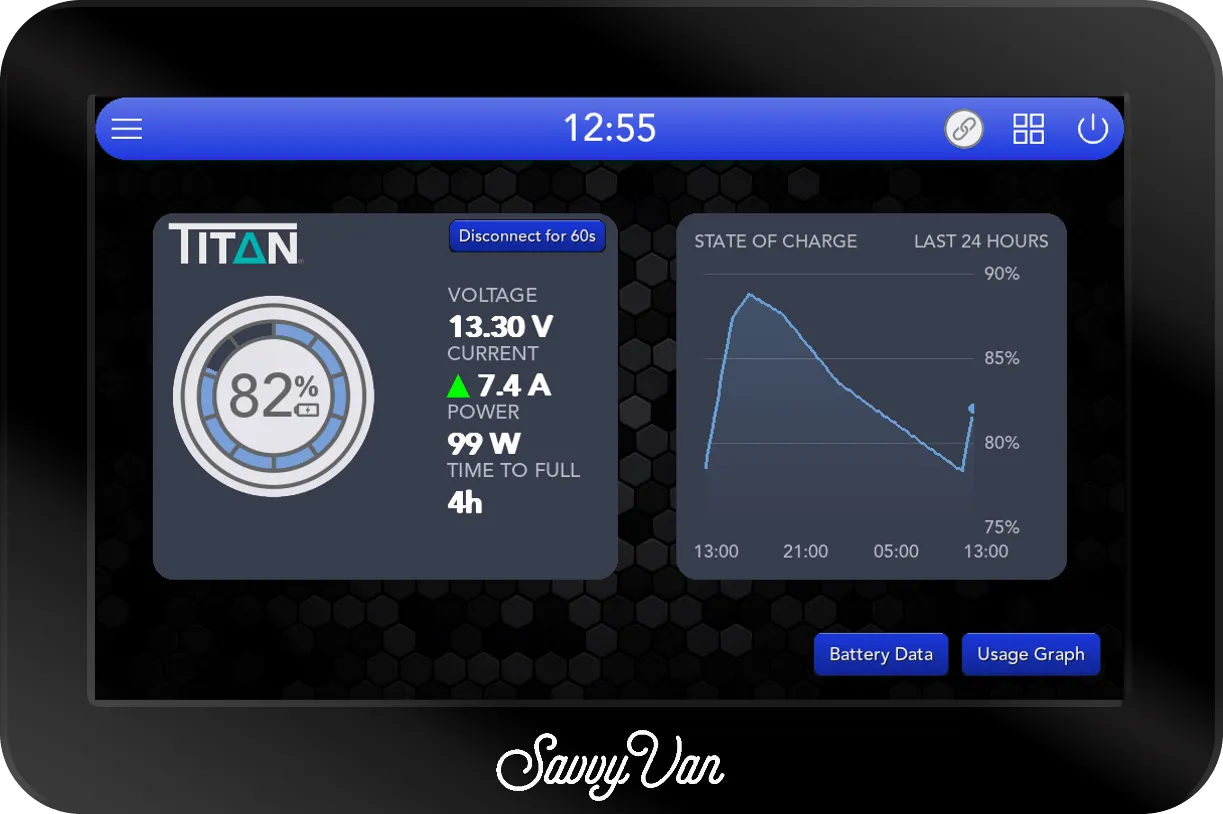
Tap the battery dial on the main screen for the battery page: the battery on a card with the battery maker’s logo at the top, VOLTAGE, CURRENT, POWER and the time to full or empty beside the dial, and, when nothing else shares the page, a STATE OF CHARGE graph next to it. Battery Data, at the bottom, opens the cell readings described below, and Usage Graph the history, by day, week or month.
State of charge comes from the battery’s own management system, so it is a figure the battery is certain of rather than one inferred from voltage. Along with it you get live current in and out, voltage, watts, and the history behind them.
That data feeds the rest of the panel too: water heater control can use spare charge rather than leaving it in the battery.
Looking at the cells
Because the panel is talking to the battery’s management system rather than measuring from outside, it can also show you what is going on inside the pack: the number of cells, every individual cell voltage and their average, the pack’s temperature, its charge cycles and its full capacity. They are one tap away, under Battery Data.
Most of the time you will never look at it. The one time it matters - a cell drifting away from the others, which is how a lithium pack usually starts to fail - you can see it on the van’s own screen, without a laptop and somebody else’s app.
If it does not appear
- Check the software version first. It is the most common cause by a mile.
- Close anything else that talks to the battery, including a phone app. A battery holds one connection at a time.
- Get closer. Pair from inside the van, near the battery, rather than from the other side of a metal wall.
- If it was paired and has gone quiet, give it a minute. The dial only
says OFL once the panel has heard nothing from the battery for a full
minute, and the battery page reads
--rather than zero.
Still nothing? Tell us what you are seeing - including the name the battery shows up as, if it shows up at all. That one detail usually settles it.
Questions people ask
- My battery is asking for a password. Do I have to remove it?
- No. Some packs are locked with a PIN, and when the panel finds a locked battery it opens a box and asks for it. Enter it once and the panel remembers it for that battery, so you will not be asked again unless you remove the device and add it back.
- Do I still need a SavvyShunt?
- No. A Titan battery reports its own state of charge, so the shunt would be measuring something the battery already knows. A van uses one source of battery data - either a shunt or a direct battery connection, never both.
- Does it work with more than one battery?
- The panel reads one battery source. If you have several batteries wired as a bank, connect to the one reporting for the bank.