
Installation guide
Wiring the 240V solid state relay
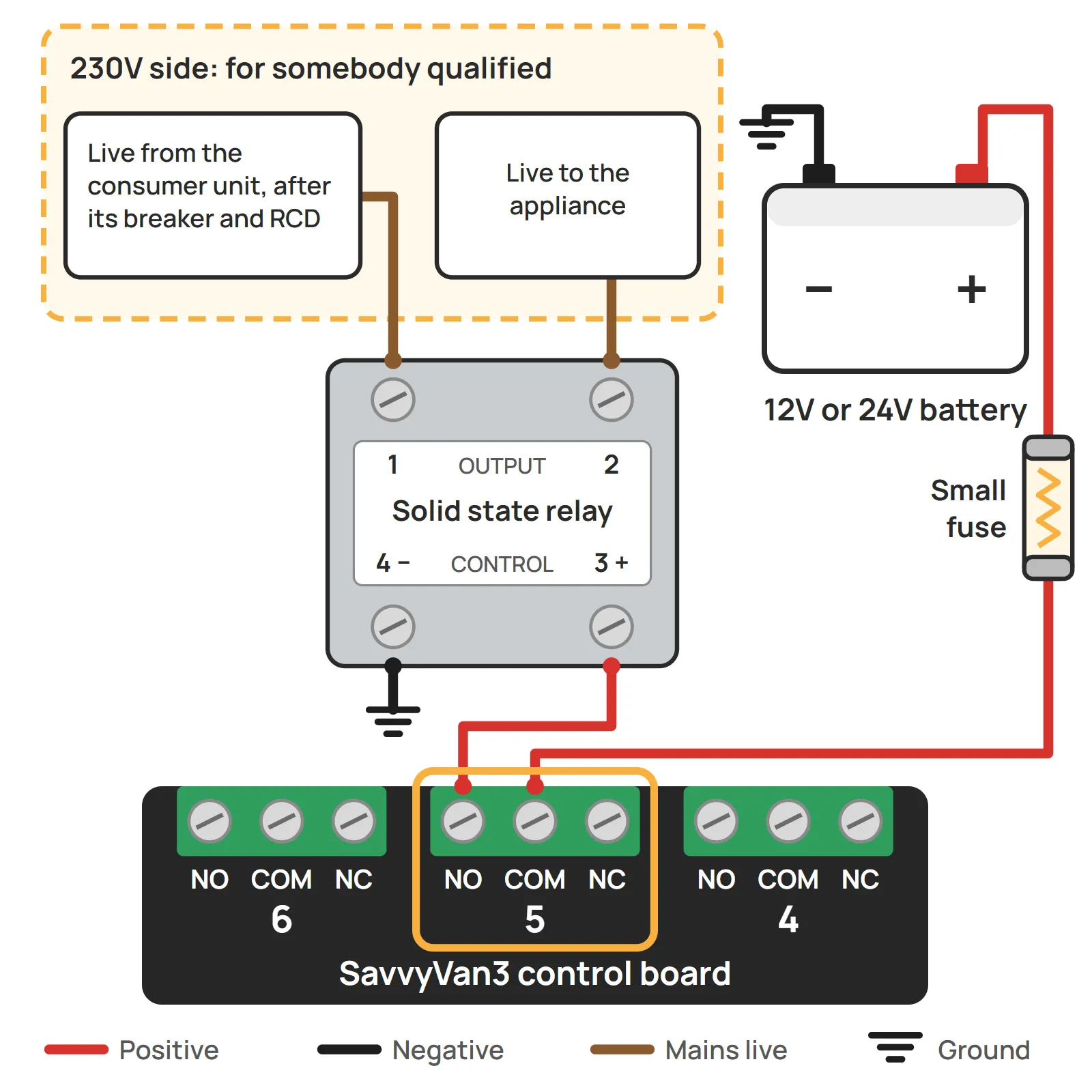
The panel switches 12V and 24V. To turn a mains appliance on and off from a tile - an immersion element, say, or a mains heater on hook-up - one of its switches drives this relay, and the relay switches the 230V. The panel's side is two thin wires and easy to do yourself. The mains side is 230V work, for somebody qualified to do it.
At a glance
- For
- A mains appliance up to 10A - about 2,300 watts
- Panel side
- COM and NO on a free switch, to the relay's 3 (+) and 4 (−)
- Mains side
- Terminals 1 and 2, in line on the live. For somebody qualified
- Control
- 3 to 32V DC, so 12V and 24V vans alike
- No moving parts
- Silent, nothing to wear out, and it runs warm under load
- What it does not do
- Switch a 12V or 24V load. It is for AC only
What it is for
A mains appliance up to 10A - about 2,300 watts at 230V. An immersion element, a mains heater, or anything else on a 230V circuit you would like a tile for. It works wherever the van has mains: on hook-up, or from an inverter while it is on.
The panel and the mains never meet. The relay’s control side takes the panel’s 12V or 24V signal, and its output side switches the mains, with no electrical connection between the two. Being solid state, it has no moving parts: no click, nothing to wear out.
What it does not do:
- Switch a 12V or 24V load. It is made for AC only. For a DC load over 10A, use the 200A high-current relay.
- Isolate the appliance. A solid state relay lets a tiny current through even when it is off. That is harmless to a heater, but it means an appliance switched off at the tile is still not safe to work on. Switch it off at the consumer unit and unplug the hook-up first.
What you will need
- The relay. One for each mains appliance you want to switch.
- A free switch on your SavvyVan3. On the standard panel that is any of the eight. On a Sargent or BCA version use 5 to 8, and on a CBE version 4 to 8 - the others already run the van’s own circuits.
- Light wire and a small fuse for the panel side. The relay’s control input takes 5 to 25mA - a few thousandths of an amp.
- Somebody qualified to work on 230V in a vehicle, for the mains side.
- Somewhere to fix it - flat, dry, with some air around it, and where nobody can touch its terminals: inside an enclosure or a locker, for example.
The relay’s terminals
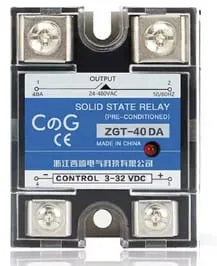
Four screw terminals, numbered on the label:
- 1 and 2, along the top, marked OUTPUT - the mains side. They go in line on the appliance’s live, either way round.
- 3 (+) and 4 (−), along the bottom, marked CONTROL - the panel’s side. This side has a polarity: positive to 3, negative to 4.
The small red light on the front comes on when the control side is getting the panel’s signal - which makes it the first thing to look at if anything does not work.
Wiring the panel side
- Feed the switch. Take a fused feed from your 12V or 24V supply to COM on the switch you chose.
- Switch to relay. From NO on that same switch, run a wire to terminal 3 (+).
- Relay to ground. Terminal 4 (−) goes to ground.
Keep these wires apart from the mains wiring, and run them separately. They are thin and carry almost nothing, so the relay can sit near the mains circuit it switches and the wires can run back to the panel.
The mains side, for somebody qualified
This is what to tell whoever wires it. It is not instructions for doing it.
- The relay goes in line on the live of the circuit feeding the appliance, through terminals 1 and 2, either way round. Never in the neutral. Neutral and earth go to the appliance as they would without it.
- On the appliance’s side of that circuit’s own protection - its breaker and RCD in the consumer unit.
- Up to 10A, AC only. The output is rated 24 to 480V AC. The 40A on its label assumes a heatsink, and it is fitted without one, so 10A is the rating that applies.
- Fixed where nobody can touch the terminals, with some air around it: it runs warm under load.
- It does not isolate. Off on the tile still lets a tiny current through, so the appliance is only safe to work on with its circuit off at the consumer unit and the hook-up unplugged.
Setting up the tile
The tile with the same number as the switch you wired is the one that turns it on and off.
- Tap the menu top-left, then Installer Settings, and enter the passcode.
- Open Tile Settings.
- Check No. of Tiles is high enough to include your switch, then tap its number under Select a Tile.
- Tap the icon box on the right and pick an icon. If nothing fits, make your own tile with its own name - the installation guide shows how.
- Advanced Options: None for most things. For an immersion heater, Water Heater adds a schedule and an auto-off delay - the installation guide explains them. Only one tile can be the water heater.
Using it
Tap the tile. Blue is on, and the relay’s red light comes on with it. Grey is off. There is no click: a solid state relay switches silently. With SavvyVan Pro, the phone app switches it like any other tile.
A few things worth knowing:
- It needs mains to switch. On hook-up, or with the inverter on, the appliance comes on with the tile. With neither, the relay switches and nothing happens.
- After a power cut, it comes back off. The panel starts with every switch off, so if the panel loses power or restarts, the appliance goes off with it. Tap the tile to turn it back on.
- The low voltage cut-off can turn it off. If the cut-off is set to drop the switch you used, it will - the installation guide explains the choices.
Troubleshooting
If the tile does nothing
Look at the relay’s red light while somebody taps the tile.
If the light comes on, the panel side is working and the fault is on the mains side:
- Is there mains? The hook-up plugged in and live, or the inverter on.
- Is the circuit’s breaker on, and the RCD not tripped?
- Does the appliance have its own switch or thermostat that is off?
Anything past that is for whoever wired the mains side.
If the light stays off, the fault is on the panel side:
- Is the feed into COM live, and its fuse intact?
- Is the wire on NO, not NC?
- Is the wire from NO on terminal 3 (+), and terminal 4 (−) to ground? The wrong way round, it does not switch.
- Is it the right tile? Tile 1 is switch 1, and so on.
If the appliance stays on with the tile off
- Is the red light still on? Then check the wire is on NO rather than NC.
- Is the light off, and the appliance still running? The relay may have failed - solid state relays usually fail on rather than off. Switch the circuit off at the consumer unit and have the relay replaced.
- Is it a small light, glowing faintly? That is the tiny current a solid state relay lets through when it is off. Harmless to a heater, but it can make a small LED lamp glow.
If it gets hot
Warm under load is normal. Hot to touch is not: switch it off and check the appliance draws no more than 10A, and that the relay has air around it rather than being boxed in tight.
Still stuck? Tell us what you are seeing, with a photograph of both sides of the relay if you can.
Questions people ask
- Can I wire it myself?
- The panel side, yes - it is two thin wires at 12V or 24V, the same as wiring a light. The mains side only if you are qualified to work on 230V in a vehicle. If you are not, that is the point to hand it to somebody who is, and most people are not.
- Will it switch a 12V or 24V load?
- No. It is made for AC, and a DC load is the wrong job for it. For a 12V or 24V load over 10A, use the 200A high-current relay instead, which has its own guide.
- Will it switch my immersion heater?
- Yes, if it draws no more than 10A, which is about 2,300 watts at 230V. An immersion element or a small mains heater is usually well inside that, and the rating plate says what yours draws.
- The label on the relay says 40A. Why do you say 10A?
- The 40A on the label is for the relay bolted to a heatsink. Ours runs without one, and without a heatsink 10A is its rating - so keep the appliance to 10A, whatever the label says.
- It says 240V, and my hook-up is 230V. Is that right?
- Yes. UK mains is 230V, and the relay is sold as a 240V part. Its output handles anything from 24V to 480V AC, so it is the same thing.
- I have a Clayton Power LPS2. Do I need this?
- No. An LPS2 switches its own 230V output, and the panel asks it to from the battery page, so nobody has to work on 230V. The Clayton guide explains it.
- Why does it get warm?
- A solid state relay turns a little of the power it switches into heat. Warm under load is normal, which is why it wants some air around it. Hot to touch is not - see the troubleshooting at the bottom of this guide.