
Installation guide
Wiring the 200A high-current relay
Each of the panel's eight switches carries up to 10A. For anything heavier - a water heater, a big pump, a compressor - the switch drives this relay and the relay carries the load. Two thin wires go from the panel to the relay's coil, the heavy cable goes through its two big studs, and the heavy current never comes near the control board.
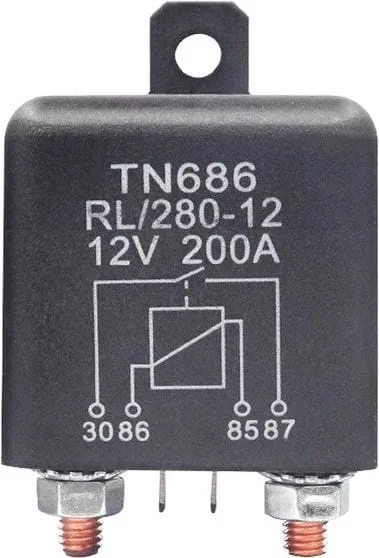
At a glance
- For
- Anything over 10A, up to 200A at 12V or 24V
- Panel side
- COM and NO on a free switch, to the relay's two small spades
- Load side
- The two big studs, in line on the appliance's positive cable
- Coil
- 12V or 24V - the same as your system
- You also need
- A small fuse for the switch, and heavy cable and a fuse for the load
- What it does not do
- Measure the load. The panel switches it and reads nothing back
What it is for
Each switch on the panel handles up to 10A. That covers lights, fans, a fridge and most of a van - but not a water heater, a big pump or a compressor. Wire one of those straight to a switch and you are asking the board to carry more than it is built for.
The relay splits the job in two. The panel’s switch turns the relay’s coil on and off, which takes very little current. The coil then closes the relay’s own heavy contacts, and those carry the appliance’s current from the battery. The panel does the deciding; the relay does the lifting.
Not sure whether you need one? Look at the appliance’s rating plate or manual. If it gives watts, divide by your battery voltage: a 300W pump on 12V draws 25A, which is well over 10A.
What it does not do: the panel does not measure the load. It switches the relay and reads nothing back, so there are no amps on the screen for that circuit.
What you will need
- The 200A relay, with the coil to match your system. The 12V relay for a 12V van, the 24V relay for a 24V one. A 12V coil on 24V overheats, and a 24V coil on 12V will not switch reliably. One relay for each appliance you want to switch.
- A free switch on your SavvyVan3. On the standard panel that is any of the eight. On a Sargent or BCA version use 5 to 8, and on a CBE version 4 to 8 - the others already run the van’s own circuits.
- Light wire, a small fuse and two spade connectors for the panel side. The coil needs very little current.
- Heavy cable, a fuse and ring terminals for the load side, sized for what the appliance draws and the length of the run - exactly as you would size them with no panel in the van.
The relay’s terminals
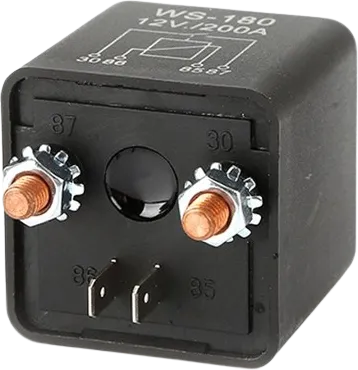
The relay has four, and the numbers are stamped on the case:
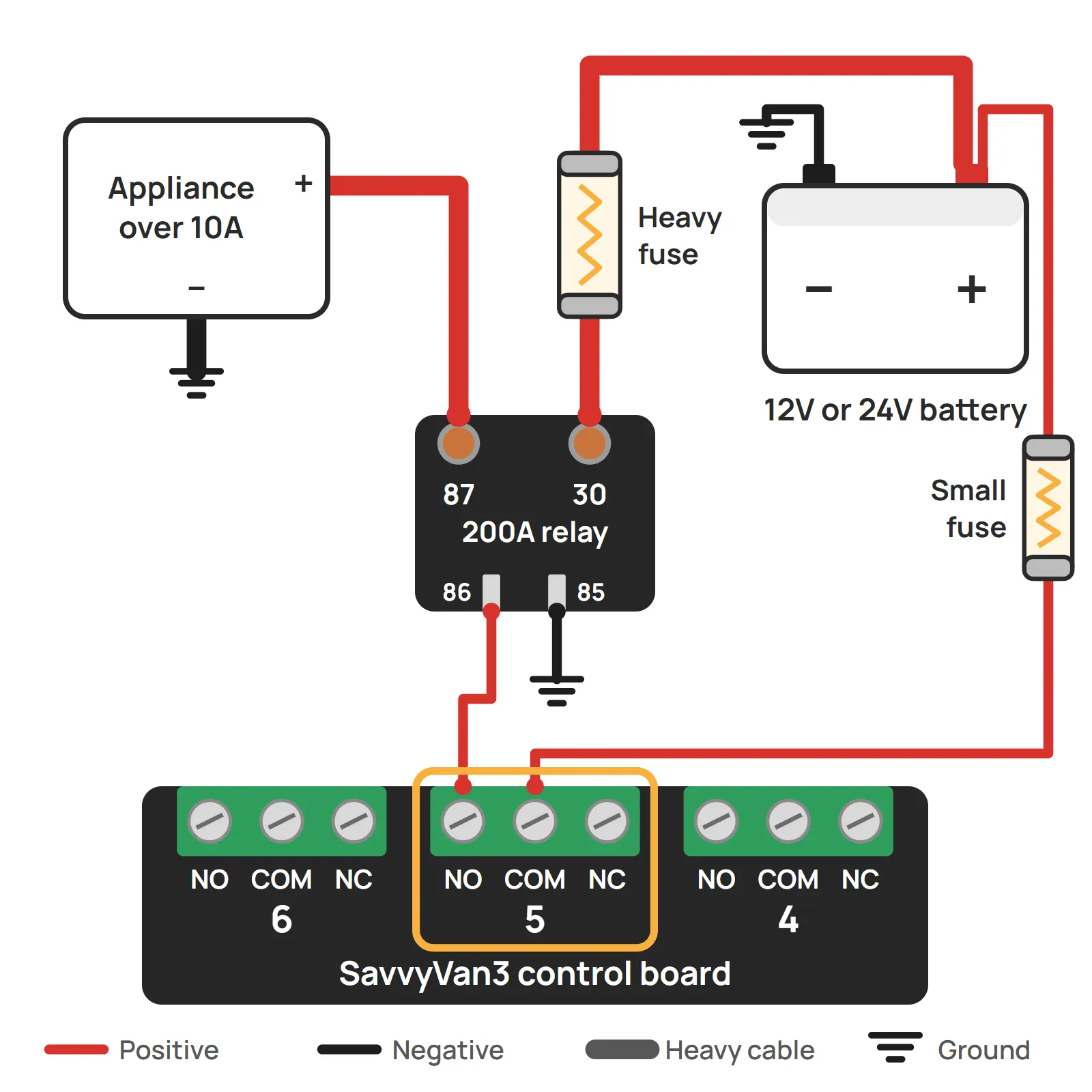
- 30 and 87 - the two big threaded studs. These carry the load, so they go in line on the appliance’s positive cable: 30 to the fused feed from the battery, 87 to the appliance.
- 85 and 86 - the two small spades. These are the coil, and the only part the panel connects to. One comes from the panel’s switch, the other goes to ground. Either way round.
Wiring the panel side
This is wired like a light on positive switching - only the “light” is the relay’s coil.
- Feed the switch. Take a fused feed from your 12V or 24V supply to COM on the switch you chose.
- Switch to coil. From NO on that same switch, run a wire to either small spade on the relay.
- Coil to ground. The other small spade goes to ground.
The relay does not have to be near the panel. These two wires carry very little, so they can be thin and run a long way. Put the relay where the heavy cable runs, and bring the thin wires to it.
Wiring the load side
- Isolate the battery.
- Fuse the heavy feed from the battery positive, as close to the battery as you can, with a fuse sized for the cable.
- Feed to stud 30. A crimped ring terminal on the stud, and the nut tight.
- Stud 87 to the appliance’s positive. Heavy cable again, with a crimped ring terminal on the stud.
- The appliance’s negative goes to ground, as it would anyway.
- Reconnect the battery.
Setting up the tile
The tile with the same number as the switch you wired is the one that turns it on and off.
- Tap the menu top-left, then Installer Settings, and enter the passcode.
- Open Tile Settings.
- Check No. of Tiles is high enough to include your switch, then tap its number under Select a Tile.
- Tap the icon box on the right and pick an icon. If nothing fits, make your own tile with its own name - the installation guide shows how.
- Advanced Options: None for most things. Water Heater for a water heater, which adds a schedule and battery protection - the Pundmann guide walks through it, and any resistive water heater works the same way. Momentary for anything that moves, so it only runs while your finger is on the tile.
Using it
Tap the tile. Blue is on, and you will hear the relay click as it closes. Grey is off. With SavvyVan Pro, the phone app switches it like any other tile.
A few things worth knowing:
- After a power cut, it comes back off. The panel starts with every switch off, so if the panel loses power or restarts, the appliance goes off with it. Tap the tile to turn it back on.
- The low voltage cut-off can turn it off. A heavy load is exactly what is worth shedding when the battery gets low. If the cut-off is set to drop the switch you used, it will - the installation guide explains the choices.
Troubleshooting
If the tile does nothing
Listen at the relay while somebody taps the tile.
If it clicks, the panel side is working and the fault is on the heavy side:
- Is the heavy fuse intact?
- Are the nuts on 30 and 87 tight, with the ring terminals properly crimped?
- Does the appliance have its own switch or thermostat that is off?
If it does not click, the fault is on the panel side:
- Is the feed into COM live, and its fuse intact?
- Is the wire on NO, not NC?
- Is the other spade connected to ground?
- Is it the right tile? Tile 1 is switch 1, and so on.
- Does the coil match your system? A 24V relay in a 12V van may not pull in at all.
If the appliance stays on with the tile off
- Is the wire on NC rather than NO?
- Is the appliance fed from somewhere else as well, bypassing the relay?
- Has the relay stuck? A relay that clicks off but leaves the appliance running may have welded its contacts shut, usually after carrying more than it should. Isolate it and replace it.
If something gets hot
The coil gets warm while it is held on, which is normal. The studs and the heavy cable should not get hot: if they do, isolate the battery, check the nuts are tight and the terminals properly crimped, and check the cable is sized for what the appliance draws.
Still stuck? Tell us what you are seeing, with a photograph of both ends of the wiring if you can.
Questions people ask
- Do I need a relay for this?
- Only if it draws more than 10A. The rating plate or the manual will say. If it gives watts, divide by your battery voltage: a 300W pump on 12V draws 25A, so it needs a relay, and a 60W fan draws 5A, so it does not.
- 12V or 24V?
- The same as your system. The relay's coil runs on your battery voltage, so a 12V van wants the 12V relay and a 24V van the 24V one.
- Can one relay switch two things?
- Not separately. A relay follows one switch, so both would come on and go off together. Give each its own relay and its own switch.
- Does the relay have to be near the panel?
- No. The two wires from the panel to the coil carry very little, so they can be thin and run a long way. Put the relay where the heavy cable runs, and bring the thin wires to it.
- Can the panel show how much current it is drawing?
- No. The panel switches the relay and reads nothing back, so there are no amps on the screen for that circuit. A SavvyShunt shows what the whole van is drawing from the battery.
- It clicks when I tap the tile. Is that normal?
- Yes. It is a mechanical relay, and the click is it switching. No click is a useful clue if something is not working - see the troubleshooting at the bottom of this guide.